

An agent writes a draft and asks a manager to approve it before anything is sent. The manager answers the next morning. Overnight a deployment restarts the container that ran the agent. Most agent code keeps its state in process memory, so the draft, the conversation and the fact that it was waiting are gone. Either the agent starts over and pays for the model calls again, or you have built your own state store and resume logic.
The Durable Task extension for Microsoft Agent Framework handles that case. Each agent call and each side effect is recorded in a durable history. While the run waits for the approval, no worker has to stay busy. When the answer arrives, any worker picks the run up, replays the history and continues where it stopped, without calling the model again for the steps that already finished.
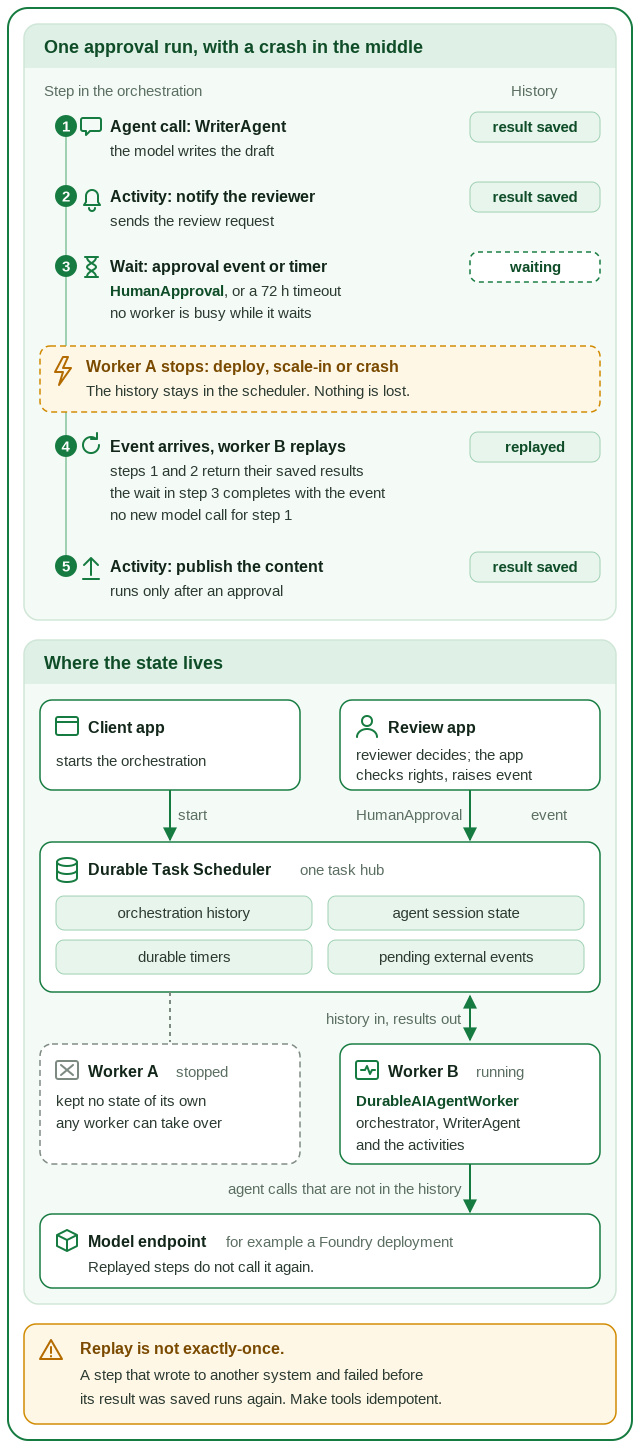
The figure shows one such run. Follow the numbered steps in the top panel, then see in the bottom panel which component holds what.
What it is#
The Durable Task extension brings the execution model of Durable Task, the same programming model that Durable Functions uses, into Microsoft Agent Framework. Microsoft announced general availability on 9 November 2026 for C# (.NET) and Python. The GitHub release v1.16.0 of 8 November 2026 ships four packages:
| Hosting | .NET 1.16.0 | Python 1.0.0 |
|---|---|---|
| Azure Functions | Microsoft.Agents.AI.Hosting.AzureFunctions | agent-framework-azurefunctions |
| Your own compute | Microsoft.Agents.AI.DurableTask | agent-framework-durabletask |
It has two parts. Durable agents keep each agent session as a durable entity: conversation history and state live in the backend, not in the worker, so a session survives restarts and scale-out. Durable workflows run an orchestration or an Agent Framework graph workflow and checkpoint every step.
The recommended backend is Durable Task Scheduler, a managed Azure service with a local emulator for development. Python needs 3.13 or later on Azure Functions and 3.10 or later on your own compute. The source is MIT-licensed in the microsoft/agent-framework-durable-extension repository.
How it works#
Three building blocks matter for using it well.
- Orchestration. Your control flow as ordinary code: call an agent or an activity, branch, loop, wait.
- Activities and agent calls. The non-deterministic work: model calls, tool calls, HTTP requests, emails. Their results are written to the orchestration history.
- Entities. Each durable agent session is an entity whose state is the conversation. Agent calls from an orchestration go through these entities.
Recovery works by replay. When an orchestration resumes, after a crash or because an awaited result arrived, a worker loads its history and runs the orchestrator code again from the top. Each call whose result is already in the history returns that saved result at once, so a finished agent call does not reach the model again. The code then continues with the first step that has no result yet.
Replay has two consequences you must design for.
- The orchestrator must be deterministic. It must make the same calls on every replay. No clock, random ids or I/O in orchestrator code: use the context, for example
context.current_utc_datetime, and put I/O in activities. - Side effects are at least once. Microsoft states plainly that checkpointing does not make tool side effects transactional or exactly-once. If a worker dies after an activity sent an email but before the result was saved, the activity runs again. Make tools and activities idempotent.
Waiting for a person uses an external event. The orchestration waits on a named event, often raced against a durable timer as in the sample below. When the reviewer answers, your application, an HTTP endpoint or an agent tool raises that event for the instance id. A person never raises it directly, so that code is also where you check that the reviewer may answer for this run.
Where it helps, and where it does not#
Useful:
- Approvals that take hours or days. The run waits on an event and a timer without holding a process, and a deployment in between does not lose it.
- Long multi-agent pipelines. A failure in step six does not repeat the model calls of steps one to five, which saves tokens and time.
- Agents behind an API with long-lived sessions. On Azure Functions the extension generates HTTP endpoints for agents and workflows, and the Flex Consumption plan scales sessions out, or to zero.
- Operations and debugging. When the app uses the Durable Task Scheduler backend, its dashboard shows conversation history, the execution timeline and reported token usage per agent session.
Less useful, or with care:
- Short, stateless requests. A single chat call that takes a few seconds and is cheap to retry gains little, and every interaction now passes through the scheduler, which adds latency.
- Large conversations. On Durable Task Scheduler an entity holds at most 1 MB of state. Retention settings and compaction help, but protected state still counts, and Microsoft states that neither compaction nor Blob payload offloading guarantees a fit.
- Token streaming. The model is request and response. Streaming goes through response callbacks, for example the official Redis Streams sample.
- Teams without Azure. The documented backend is an Azure service. You can run the workers anywhere, but the state lives in Durable Task Scheduler or, by default on Functions, Azure Storage.
Example: an approval that survives a restart#
The code below is condensed from the official Python sample 07_single_agent_orchestration_hitl at tag v1.16.0. I did not run it here: it needs a model deployment in a Microsoft Foundry project, an Azure sign-in and a running scheduler. Logging, input validation, the rejection loop and the return value of the sample are simplified. The packages need Python 3.10 or later on your own compute.
The worker registers the agent, two activities and the orchestration:
import os
from datetime import timedelta

from agent_framework_durabletask import (
    DurableAIAgentOrchestrationContext,
    DurableAIAgentWorker,
)
from durabletask.azuremanaged.worker import DurableTaskSchedulerWorker
from durabletask.task import when_any
from pydantic import BaseModel


class GeneratedContent(BaseModel):
    title: str
    content: str


def content_generation_hitl_orchestration(context, payload):
    writer = DurableAIAgentOrchestrationContext(context).get_agent("WriterAgent")
    session = writer.create_session()

    # 1. Agent call. Its result goes into the history; replay reuses it.
    response = yield writer.run(
        messages=f"Write a short article about '{payload['topic']}'.",
        session=session,
        options={"response_format": GeneratedContent},
    )
    content = response.value

    # 2. Side effects belong in activities, never in the orchestrator.
    yield context.call_activity("notify_user_for_approval", input=content.model_dump())

    # 3. Wait for a person or a durable timer, whichever comes first.
    approval = context.wait_for_external_event("HumanApproval")
    timeout = context.create_timer(context.current_utc_datetime + timedelta(hours=72))
    winner = yield when_any([approval, timeout])
    if winner != approval:
        raise TimeoutError("No decision within 72 hours.")

    # 5. Continue with the decision.
    decision = approval.get_result()
    if decision["approved"]:
        yield context.call_activity("publish_content", input=content.model_dump())
    return {"approved": decision["approved"], "title": content.title}


worker = DurableTaskSchedulerWorker(
    host_address="http://localhost:8080",  # local emulator
    secure_channel=False,
    taskhub=os.environ["TASKHUB"],  # a new, uniquely named task hub
    token_credential=None,
)
agent_worker = DurableAIAgentWorker(worker)
agent_worker.add_agent(create_writer_agent())  # an Agent named "WriterAgent"
worker.add_activity(notify_user_for_approval)
worker.add_activity(publish_content)
worker.add_orchestrator(content_generation_hitl_orchestration)
worker.start() # the sample then keeps the process alivecreate_writer_agent, notify_user_for_approval and publish_content are plain functions in the sample: the first builds an Agent Framework Agent on a Foundry chat client, the other two are activities that log the content. The sample passes the timeout in its input: the input model defaults to 300 seconds, its interactive client asks for hours with a default of 5, and a code comment suggests 72 hours in production. Step 4 of the figure, the replay, needs no code: the runtime does it.
A client starts the run and, hours later and from any process, delivers the decision:
import os

from durabletask.azuremanaged.client import DurableTaskSchedulerClient

client = DurableTaskSchedulerClient(
    host_address="http://localhost:8080",
    secure_channel=False,
    taskhub=os.environ["TASKHUB"],  # the same hub as the worker
    token_credential=None,
)

instance_id = client.schedule_new_orchestration(
    orchestrator="content_generation_hitl_orchestration",
    input={"topic": "Durable execution for AI agents"},
)

# Later, when the reviewer has decided:
client.raise_orchestration_event(
    instance_id=instance_id,
    event_name="HumanApproval",
    data={"approved": True, "feedback": ""},
)
To try it, the sample's README starts the scheduler emulator in Docker, with the dashboard on port 8082, and sets TASKHUB to a new, uniquely named task hub plus DURABLE_AGENTS_DEPLOYMENT_MODE=isolated_v2. Stop the worker while the run waits, start it again, then raise the event. By the documented behaviour the run then completes without a new model call for the draft, and the dashboard on port 8082 lets you check that.
The same pattern exists in C# with WaitForExternalEvent and RaiseEventAsync, and for graph workflows with RequestPort in .NET or ctx.request_info() in Python. On Azure Functions the extension also exposes a respond endpoint per workflow for the approval.
Pros, cons and limits#
| Aspect | Details |
|---|---|
| Maturity | GA since November 2026, .NET 1.16.0 and Python 1.0.0. The previews before it carried breaking state changes, so read the upgrade note below. |
| Pros | Agent calls are checkpointed without changes to the agent logic. Waiting costs no running worker. Recovery is automatic, where plain Agent Framework workflows need checkpointing that you manage (comparison on Microsoft Learn (opens in a new tab)). Open source under MIT. |
| Cons | Orchestrator code must be deterministic. Side effects are at least once, so tools need idempotency. Every interaction passes through the scheduler, which adds latency. |
| Limits | 1 MB entity state on Durable Task Scheduler. In .NET, idle sessions can be deleted by a time-to-live you configure; Python has retention and state-budget settings instead. Deleted history cannot be recovered. |
| Pricing and lock-in | No price for the extension itself. You pay for the hosting plan, the durable backend (Durable Task Scheduler or Azure Storage) and the model tokens; check the Azure pricing pages. State lives in an Azure service. |
| Security | Session and request ids are identifiers, not authorization. Check that the caller owns the instance before you accept an approval event. |
One upgrade note. The GA packages write a new state schema, and the previews carried breaking state changes. Microsoft warns not to replace all workers on an existing task hub and assume every session or workflow history can resume. In Python you choose a deployment mode explicitly: isolated_v2 on a new, empty task hub, as the samples do, or two_phase for an in-place upgrade of agent entities with scheduler filtering. Either way, older workflow histories must finish on their original workers and hub.
When to choose it#
Choose it when your agents already run on Agent Framework, live on Azure, and either wait on people or run long enough that a restart in the middle is likely and expensive. The approval pattern alone, an event raced against a timer with no worker held, is reason enough for many internal agent workflows.
Skip it for short request and response agents, for transcripts that will not fit in 1 MB of entity state, and when your state must stay outside Azure.
Next step: read the Durable Task extension page on Microsoft Learn (opens in a new tab), then run the human-in-the-loop sample from the repository (opens in a new tab) against the local emulator and stop the worker halfway.