

A support agent can look up orders on its own. Cancelling one is different: a person should see the exact call, cancel_order(order_id=1042), and say yes or no before it runs. That person may answer in ten seconds or the next morning, and by then the process that started the run may be gone.
The OpenAI Agents SDK for Python handles this with three pieces: a tool that declares it needs approval, a run that stops with a list of pending calls, and a RunState that you save as JSON and resume later, in the same process or another one. As of 28 November 2026 the current stable release is v0.26.0.
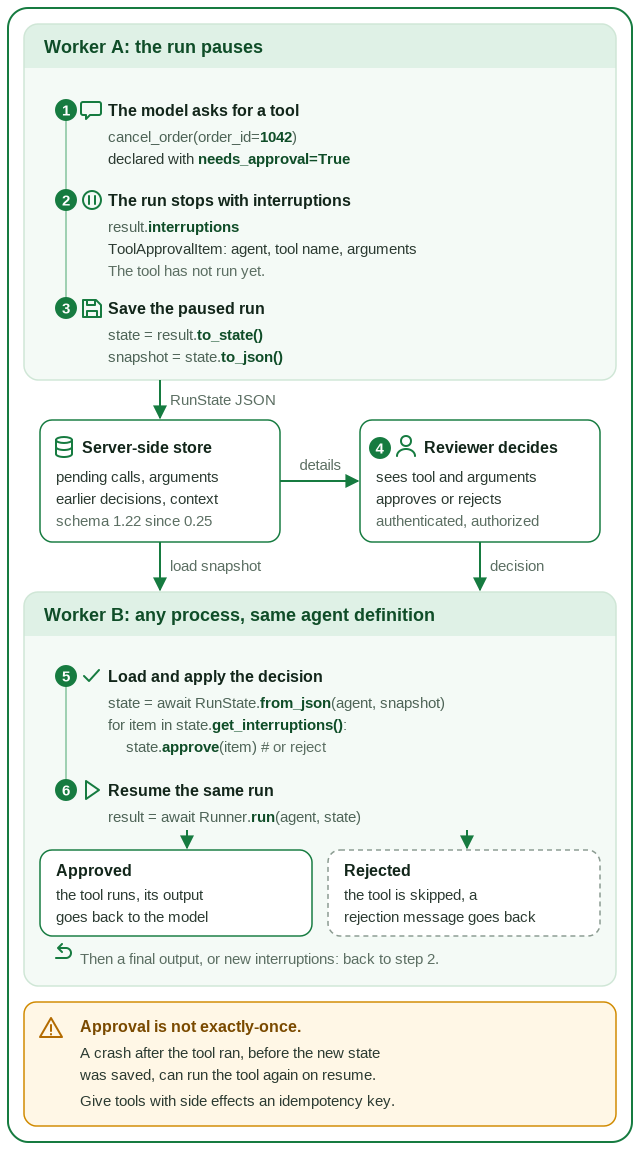
The figure shows the whole cycle. Read it from top to bottom: worker A pauses and saves the run, a reviewer decides, and worker B loads the snapshot and resumes it.
What it is, and what is new#
Human-in-the-loop (HITL) in the Agents SDK is a set of APIs on the runner, not a separate service. A tool declares when it needs approval. When the model calls it, the run stops before the tool executes and returns the pending calls as interruptions. You turn the result into a RunState, record a decision per call and run again.
This API is not new. It shipped in v0.8.0 (5 February 2026), and the human-in-the-loop page of the documentation followed in v0.8.1. What November brought is maintenance on top of it:
- v0.25.0 (published 18 November 2026). Approvals raised inside nested agent tools now resume correctly when output guardrails are configured. To record this,
RunStatesnapshots move to schema 1.22. Pydantic run contexts are also checkpointed differently, and the release notes add: "Applications that share checkpoints across workers should upgrade readers first." A fix preserves nestedToolContextapproval decisions across resume, and the demo REPL can approve or reject single tool calls. - v0.26.0 (24 November 2026). A minor release with breaking changes for Docker storage mounts, custom Realtime tracing and local images in the experimental Codex tool, none of them in the core approval API. Near this topic: an input guardrail tripwire now stops queued function tools, and a model-supplied image path in the Codex tool no longer grants access, also for pending calls; the application grants each trusted image as a named reference.
Both are regular PyPI releases. The SDK is still on 0.x versions: per its own release policy, a minor version can break public interfaces that are not marked beta, so pin it.
How the approval flow works#
You mark a tool with needs_approval. It takes True for always, or an async function that decides per call from the run context, the parsed arguments and the call ID. This snippet is taken from the v0.26.0 documentation and was not run here:
from agents import Agent
from agents.decorators import tool


@tool(needs_approval=True)
async def cancel_order(order_id: int) -> str:
    return f"Cancelled order {order_id}"


async def requires_review(_ctx, params, _call_id) -> bool:
    return "refund" in params.get("subject", "").lower()


@tool(needs_approval=requires_review)
async def send_email(subject: str, body: str) -> str:
    return f"Sent '{subject}'"


agent = Agent(
    name="Support agent",
    instructions="Handle tickets and ask for approval when needed.",
    tools=[cancel_order, send_email],
)
A per-call rule fails closed: if the arguments are missing, malformed JSON, not a JSON object or contain values such as NaN, the function is not called and the call needs manual approval.
When an approval is needed and no decision is stored for that call, the run pauses. result.interruptions then holds ToolApprovalItem entries with the agent name, the tool name and the arguments. You call result.to_state(), then state.approve(item) or state.reject(item) per entry, and resume with Runner.run(agent, state), where agent is the original top-level agent.
Details that matter in practice:
- Run-wide. Approvals raised after a handoff or inside a nested
Agent.as_tool()surface on the outer run. You always resume the top-level run. - Partial decisions. You can decide some items and resume; the rest pause the run again.
- Sticky decisions.
always_approve=Trueoralways_reject=Trueapplies to later calls of the same tool and is stored inRunState. For function tools it is scoped to the agent that asked. For local shell and apply_patch tools it is not; the docs warn about this. - Rejection text.
state.reject(item, rejection_message=...)controls what the model sees.RunConfig.tool_error_formattersets a run-wide default. - Other tool types. Local MCP servers use
require_approval.HostedMCPToolusestool_config={"require_approval": "always"}. Local shell and apply_patch tools can decide in code withon_approvalinstead of pausing, but only together withneeds_approval=True: for them approval is off by default, and the callback alone enables nothing.HostedMCPToolhason_approval_requestfor the same purpose.
Resuming in another process#
RunState is built to be stored. state.to_json() or state.to_string() writes it; RunState.from_json(agent, data) or RunState.from_string(...) reads it back, given the same agent definition. The snapshot holds pending tool calls, their arguments, approval decisions, usage, trace metadata and your app context. Do not put secrets in that context.
For a browser or mobile approval screen, the docs describe a server-side pattern:
- Keep the full snapshot in storage the application controls. Send the reviewer only the tool details they may see, plus opaque IDs. Tool names and arguments are untrusted content: escape them when you render them.
- Authenticate the reviewer through your own session handling, never from the request body.
- Authorize that reviewer for that run and those calls. Knowing a run ID is not authorization.
- Accept only decision IDs and yes or no from the client, and check them against the pending requests on the server. Never accept tool calls, arguments, approval records or serialized state from the client.
- Load the stored snapshot, take the pending items from
state.get_interruptions(), apply the decisions and resume. Make sure the same snapshot cannot be resumed twice, with an atomic owner-checked transition in shared storage.
from_json does not authenticate the snapshot. A schema check does not make a snapshot from an untrusted client safe.
Two version rules come with storing state. Each SDK writes its current schema (1.21 in v0.24.0, 1.22 in v0.25.0 and v0.26.0), and an older SDK refuses a newer schema. When several workers share snapshots, upgrade the workers that read before the ones that write. The docs also advise storing a version marker for your agent definitions next to the snapshot, because approvals can wait while your prompts or tools change.
If you use a session for conversation history, pass the same session, or one with the same session ID and backing store, when you resume.
Where it fits, and where it does not#
Good fits:
- Actions with real effects. Refunds, cancellations, outbound email, writes to production systems, shell commands from a coding agent.
- Slow reviewers. Decisions that arrive through a ticket, a chat message or a web form, minutes or days later.
- Rules plus people. A
needs_approvalfunction that only escalates the risky cases, such as amounts above a limit.
Poor fits:
- Every call. If every tool needs approval, reviewers approve without reading. Use a rule.
- Policy that code can decide. If the answer follows from identity and arguments, decide it in code with a callback or a policy layer in front of the tools, and keep people for the rest.
- Exactly-once guarantees. Approval does not give them; see below.
Example: pause, approve, resume#
The script below is the example from the v0.26.0 human-in-the-loop page, unchanged. It is taken from the official documentation and was not run here: it calls a model and needs an API key. The SDK requires Python 3.10 or later; install it with pip install openai-agents==0.26.0 and set OPENAI_API_KEY.
import asyncio
import json
from pathlib import Path

from agents import Agent, Runner, RunState
from agents.decorators import tool


async def needs_oakland_approval(_ctx, params, _call_id) -> bool:
    return "Oakland" in params.get("city", "")


@tool(needs_approval=needs_oakland_approval)
async def get_temperature(city: str) -> str:
    return f"The temperature in {city} is 20° Celsius"


agent = Agent(
    name="Weather assistant",
    instructions="Answer weather questions with the provided tools.",
    tools=[get_temperature],
)

STATE_PATH = Path(".cache/hitl_state.json")


def prompt_approval(tool_name: str, arguments: str | None) -> bool:
    answer = input(f"Approve {tool_name} with {arguments}? [y/N]: ").strip().lower()
    return answer in {"y", "yes"}


async def main() -> None:
    result = await Runner.run(agent, "What is the temperature in Oakland?")

    while result.interruptions:
        # Persist the paused state.
        state = result.to_state()
        STATE_PATH.parent.mkdir(parents=True, exist_ok=True)
        STATE_PATH.write_text(state.to_string())

        # Load the state later (could be a different process).
        stored = json.loads(STATE_PATH.read_text())
        state = await RunState.from_json(agent, stored)

        for interruption in result.interruptions:
            approved = await asyncio.get_running_loop().run_in_executor(
                None, prompt_approval, interruption.name or "unknown_tool", interruption.arguments
            )
            if approved:
                state.approve(interruption, always_approve=False)
            else:
                state.reject(interruption)

        result = await Runner.run(agent, state)

    print(result.final_output)


if __name__ == "__main__":
    asyncio.run(main())
What to notice:
- The rule decides. A question about Oakland pauses; any other city runs without asking.
- Save, then load. The state goes to disk and comes back through
RunState.from_jsonbefore any decision is made. In production the write and the read are in different processes. - One process here. The loop still has
resultfrom the first run and takes the pending items from it. A separate worker only has the snapshot, so it usesstate.get_interruptions()on the loaded state, as in step 5 of the figure. - The loop. A resumed run can raise new approvals, so the code loops until there are none.
The repository has a fuller server-side version in examples/agent_patterns/human_in_the_loop_server.py. Its own docs call it a simulation, not a deployable HTTP service.
Recovery after a crash#
Approval allows a tool call to run. It does not make it run exactly once. If the tool performs an external action and the process stops before the new state is saved, resuming from the older approved snapshot can run the tool again. The docs use a payment as the example.
For tools with side effects, give each logical action a stable idempotency key and pass it to a destination that rejects duplicates. Where that is not available, check the outcome with the destination before you retry, and record an unknown outcome instead of replaying it. A missing result in an ordinary lookup does not prove that a retry is safe: reads can lag, and an earlier request can still complete.
A preview: ResumableSession in 1.0.0-alpha.2#
On 23 November 2026 the project published v1.0.0-alpha.2, a prerelease whose wheels are on GitHub only, not on PyPI. It adds ResumableSession, which stores conversation history and pending approvals together, with a ResumableSessionStore that needs atomic conditional writes, or RedisSessionStore, and one writer per session. A replacement worker calls await ResumableSession.resume(store, session_id) and await session.load_state(agent), recreates the run configuration with the same tools, hooks and authorization policy, approves or rejects, and continues the run. The same alpha adds tool execution hooks.
Treat it as a preview. Alpha.2 writes RunState schema 1.24, and alpha.1 cannot read those snapshots; the release notes say to upgrade checkpoint readers before writers. Do not store long-lived approvals in that format yet.
Pros, cons and limits#
| Aspect | Details |
|---|---|
| Pros | Built into the runner: no extra service. Works across handoffs, nested agent tools, MCP servers and streaming runs. Per-call rules fail closed. State is plain JSON in your own storage. |
| Cons | 0.x versioning: minor releases can break public interfaces. Snapshot schemas move forward, and older SDKs refuse newer snapshots. The approval screen, authentication and authorization are yours to build. |
| Limits | No exactly-once execution of approved tools. Snapshots are not authenticated by the SDK. Resume needs the same agent definition, so changing prompts or tools while approvals wait needs a version marker and a migration plan. |
| Lock-in | The approval API is specific to this SDK. The snapshot format is the SDK's own and changes between versions. |
When to use it#
Use it when an agent built on the Agents SDK takes actions you would not let a new colleague take unsupervised, and when the person who decides is not sitting at the terminal. Start with one high-impact tool, a needs_approval rule rather than True, and snapshots in server-side storage with a version marker. Add idempotency keys before you add more tools.
Wait for 1.0 before you build on ResumableSession; on v0.26 you get the same approval flow with RunState, and you coordinate the history and snapshot storage yourself.
Next step: read the human-in-the-loop page (opens in a new tab) of the documentation, in particular the sections on long-running approvals and recovery after a crash.