

An agent has to save a 40 MB report through an MCP tool, save_to_folder. MCP has no standard way to get the file there, so servers use their own conventions, such as a base64 string in an argument or a URL the user has to produce first. Base64 inflates the JSON-RPC payload, and if the model has to emit it, the bytes pass through its context as tokens.
On 10 November 2026 the MCP maintainers announced a draft extension for this: io.modelcontextprotocol/files. The client sends the file's metadata, the server answers with an upload target, and the client sends the bytes straight to storage and calls the tool again. The model sees the result, never the bytes or the URL.
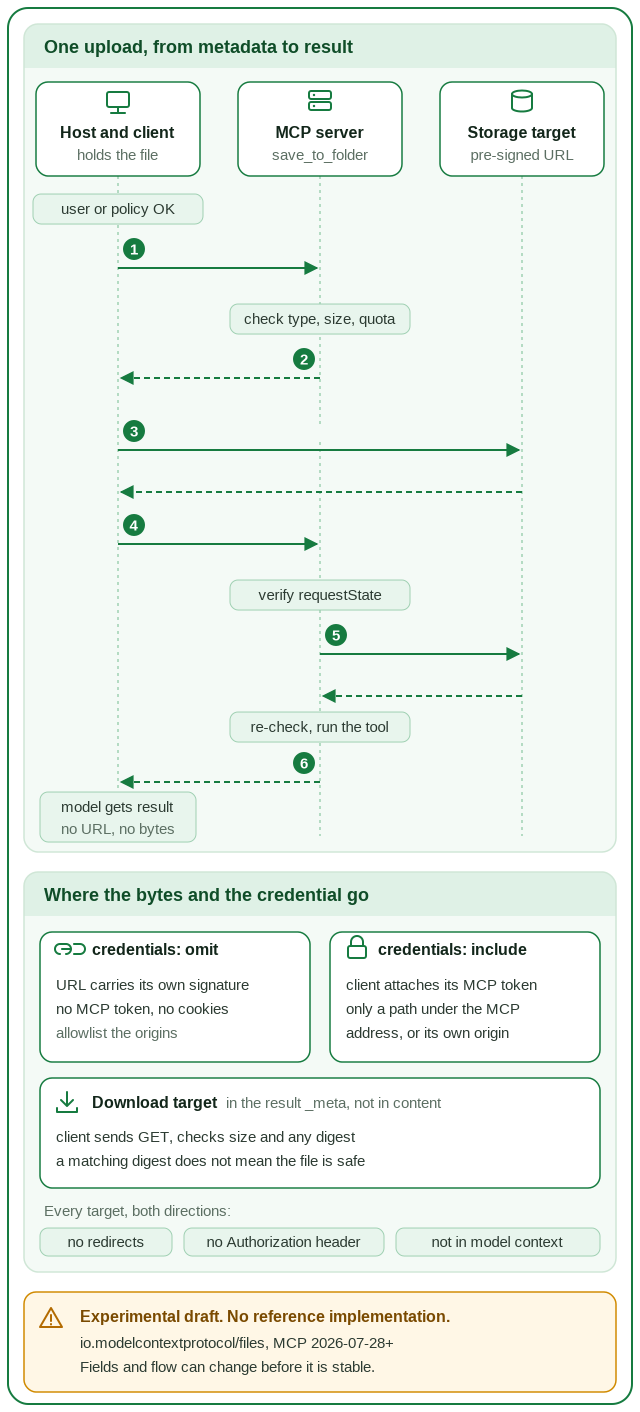
The figure shows that flow: read the top panel from step 1 to 6, then the bottom panel for credentials and downloads.
What the files extension is#
It is an optional MCP extension, an experimental draft of the File Uploads Working Group. Its repository states that it is not part of the MCP specification, has not been proposed as a SEP (Specification Enhancement Proposal), and may break while the group iterates. There is no reference implementation; the group plans one before it submits the SEP. The maintainers expect to finalize it before the end of 2026, an expectation, not a release date.
It needs MCP protocol revision 2026-07-28 or later and covers three things:
- File arguments. A tool marks an argument as a file with
x-mcp-filein its input schema. - Uploads. A small file can travel inline as base64, a larger one out of band to a target the server names.
- Downloads. A tool can return a download target in its result. The working group has discussed this part but not reviewed its shape.
It is optional. A client that does not know x-mcp-file sees an object argument it cannot fill correctly, so servers should hide such tools from clients that did not declare the extension, or offer a variant that takes the file another way.
How an upload works#
A server advertises the extension in server/discover, with upload and maxInlineBytes (the largest total of inline data per request). The client declares upload and download in the io.modelcontextprotocol/clientCapabilities metadata of each request that may need them, tools/list included. A file argument is a FileInput: id, mimeType, size, and optional name, SHA-256 digest and data. The host fills it in from the user's selection or under its approval policy; the draft tells hosts not to show the x-mcp-file schema to a model that emits arguments as tokens, and allows a host-defined handle instead.
The upload has six steps, numbered as in the figure:
- Metadata call. After the user's approval, or operator policy when no user is present, the client calls the tool without the file's
data. The server checks quota, permissions,acceptandmaxSize. A failure is a normal tool error, before 40 MB has moved. - Upload request. Otherwise the server returns a result of the new type
upload_required: one target per file (urlorpath,method,headers,credentials,expiresAt) and an opaquerequestState. - Transfer. The client sends the bytes with
PUT(the default) orPOST, optionally as a multipart form. Any2xxis success. - Retry. Only when every file got a
2xx, the client calls the tool again with the same arguments andrequestStateunchanged, without returning control to the model. This is the Multi Round-Trip Requests (MRTR) pattern of the 2026-07-28 specification. - Confirm. The server verifies
requestState, checks the tool name, arguments and authenticated principal against the values bound in it, and confirms with the storage that the bytes arrived. - Run. It re-checks size, and type if the tool restricts it, then runs the tool. If a transfer fails, there is no retry and the tool does not run.
requestState holds the unfinished job. MRTR requires the server to treat it as attacker-controlled and, when it affects authorization or business logic, to protect its integrity, for example with an HMAC. Because the state travels with the request, any server instance that can verify it and reach the storage can handle the retry. The files draft also requires an expiry on every requestState, and a tool that must not run twice needs a shared record that marks each one as used.
Downloads and credentials#
For a download, the tool returns its normal content plus targets under _meta. The client fetches the ones it wants with GET, checks size and any digest, and discards a file that fails. A matching digest does not make a file safe: name, type and bytes stay untrusted.
Every target carries a credentials field:
omit: the client attaches no MCP token, cookies or client certificate. The target authorizes itself, typically with a signature in a pre-signed URL.include: the client attaches its MCP credential, only to apathunder its MCP address or a URL on the server's own origin.
The client also refuses redirects, rejects targets that set Authorization or Cookie headers, refuses addresses that are not globally reachable (private ranges, for example) unless an operator allowlist permits them, and never puts a target into model context. The main gap the draft names: user approval happens before the target is known, so a malicious server can name any public URL as an omit target and receive the file there. The draft recommends an allowlist of origins for omit targets; whether it becomes mandatory is an open question.
Where it helps, and where it does not yet#
Useful cases, taken from the working group's own examples:
- Saving a large file from a conversation to cloud storage.
- Moving a large CSV into a sandbox for an agent to analyze with code.
- Uploading a deck or a ZIP of assets to a remote service.
- Exports from a tool, such as a 200 MiB CSV, without base64 in the result.
Not yet, or with care:
- Production use. There is no reference implementation as of 28 November 2026, and the draft says anything can change before the SEP.
- Gateways that hide tools. A gateway that exposes one generic executor tool hides the inner
x-mcp-fileschema. This is still open. - Resumable uploads. Chunked and resumable transfers are future work.
Example: the upload flow in standard-library Python#
With no reference implementation yet, the script below is a simulation. One process plays the client, the server and a storage target on loopback. The server signs requestState and the upload URL with HMAC-SHA256. A retry with a changed argument gets -32602, the error code the draft gives for a requestState that does not match the call. A second call declares a 200 MiB file and is rejected on metadata alone. Real targets use https; the draft allows http on loopback only under an operator allowlist.
It needs Python 3.12 and only the standard library.
"""Upload flow of the MCP files extension draft, simulated. Not an MCP implementation."""
import base64, hashlib, hmac, http.server, json, os, threading, time, urllib.request

KEY = os.urandom(32)              # server secret for requestState and upload URLs
STAGING = {}                      # bytes that reached the storage target
MAX_SIZE = 150 * 1024 * 1024      # x-mcp-file maxSize of the tool


def mac(data: bytes) -> str:
    return hmac.new(KEY, data, hashlib.sha256).hexdigest()


class Storage(http.server.BaseHTTPRequestHandler):
    def do_PUT(self):
        path, _, sig = self.path.partition("?sig=")
        if not hmac.compare_digest(sig, mac(path.encode())):
            self.send_response(403); self.end_headers(); return
        STAGING[path] = self.rfile.read(int(self.headers["Content-Length"]))
        self.send_response(201); self.end_headers()

    def log_message(self, *args):
        pass


storage = http.server.HTTPServer(("127.0.0.1", 0), Storage)
threading.Thread(target=storage.serve_forever, daemon=True).start()


def server_tools_call(params):
    """The MCP server side of tools/call for a save_to_folder tool."""
    args, f = params["arguments"], params["arguments"]["file"]
    if "requestState" not in params:                      # initial call: metadata only
        if f["mimeType"] != "application/pdf" or f["size"] > MAX_SIZE:
            return {"resultType": "complete", "isError": True,
                    "content": [{"type": "text", "text": "File rejected on metadata."}]}
        path = "/staging/" + os.urandom(6).hex()
        state = json.dumps({"tool": params["name"], "args": args, "path": path,
                            "exp": time.time() + 600}).encode()
        return {"resultType": "upload_required",
                "uploads": [{"fileId": f["id"], "credentials": "omit",
                             "url": f"http://127.0.0.1:{storage.server_port}{path}?sig={mac(path.encode())}",
                             "headers": {"Content-Type": f["mimeType"]}}],
                "requestState": base64.urlsafe_b64encode(state).decode() + "." + mac(state)}
    mismatch = {"error": {"code": -32602, "message": "requestState does not match this call"}}
    blob, _, sig = params["requestState"].rpartition(".")  # retry: verify before parsing
    try:
        state = base64.urlsafe_b64decode(blob)
    except ValueError:
        return mismatch
    if not hmac.compare_digest(sig, mac(state)):
        return mismatch
    bound = json.loads(state)
    if bound["exp"] < time.time() or bound["tool"] != params["name"] or bound["args"] != args:
        return mismatch
    data = STAGING.get(bound["path"])
    if data is None or len(data) != f["size"] or not data.startswith(b"%PDF-"):
        return {"resultType": "complete", "isError": True,
                "content": [{"type": "text", "text": "Upload not confirmed."}]}
    return {"resultType": "complete",
            "content": [{"type": "text", "text": f"Saved {f['name']} ({len(data)} bytes) to {args['folderId']}."}]}


def client_call(name, args, pdf):
    """The client side: metadata first, then PUT the bytes, then retry with requestState."""
    call = {"name": name, "arguments": args}
    result = server_tools_call(call)
    if result.get("resultType") != "upload_required":
        print("1 tools/call  ->", result)
        return
    print("1 tools/call  -> upload_required")
    for target in result["uploads"]:
        assert target["credentials"] == "omit"                # no MCP token to storage
        put = urllib.request.Request(target["url"], data=pdf, method="PUT", headers=target["headers"])
        print("2 PUT bytes   ->", urllib.request.urlopen(put).status)
    retry = dict(call, requestState=result["requestState"])
    print("3 retry       ->", server_tools_call(retry))
    tampered = dict(retry, arguments=dict(args, folderId="fld_other"))
    print("4 changed arg ->", server_tools_call(tampered))


pdf = b"%PDF-1.7\n" + os.urandom(2048)
file = {"id": "file-1", "name": "Q3 report.pdf", "mimeType": "application/pdf", "size": len(pdf)}
client_call("save_to_folder", {"folderId": "fld_8c1a", "file": file}, pdf)
client_call("save_to_folder", {"folderId": "fld_8c1a", "file": dict(file, size=200 * 1024 * 1024)}, pdf)python3.12 upload_flow.pyThe output, from a run on 28 November 2026 with Python 3.12.14:
1 tools/call  -> upload_required
2 PUT bytes   -> 201
3 retry       -> {'resultType': 'complete', 'content': [{'type': 'text', 'text': 'Saved Q3 report.pdf (2057 bytes) to fld_8c1a.'}]}
4 changed arg -> {'error': {'code': -32602, 'message': 'requestState does not match this call'}}
1 tools/call  -> {'resultType': 'complete', 'isError': True, 'content': [{'type': 'text', 'text': 'File rejected on metadata.'}]}
What to notice:
- The bytes never touch the tool call. Only the
PUTcarries the 2,057 bytes. - The state is bound to the call. A changed
folderIdno longer matches the arguments bound inrequestState, so an approved upload cannot be redirected to another folder.
Left out, and needed in a real server: capability declarations in _meta, https targets, target expiry tied to requestState, a staging location that accepts one write, size enforcement at the storage, single use of requestState for tools that must not run twice, and redaction of targets and requestState in logs.
Pros, cons and limits#
| Aspect | Details |
|---|---|
| Pros | One convention instead of ad-hoc base64. Bytes go straight to storage, out of model context. Metadata checks fail fast. Stateless retries. |
| Cons | Experimental draft with no reference implementation as of 28 November 2026. Out-of-band uploads need storage that issues signed, short-lived targets, or an upload endpoint under the MCP address. |
| Limits | Tools only, not resources yet. No resumable upload. The download shape is not reviewed. Executor gateways hide the file marker. |
| Security | Allowlist omit origins. Treat downloads as untrusted. Redact pre-signed URLs and requestState in logs. |
When to use it#
Do not ship it in a product yet. Read it now if you build an MCP server or host that moves files: it answers questions you would otherwise settle alone (who approves, which credential goes where, how a retry proves the bytes arrived), and the working group wants that feedback. Design your storage for short-lived, single-write targets today. In my reading that part is the most likely to carry over, even if field names change.
Next step: read the draft specification (opens in a new tab), in particular its Security Implications and Open Questions sections, and open an issue in the extension repository (opens in a new tab) if your storage backend does not fit the flow.