

An agent that can reach a CRM, a ticket system, a calendar and two or three MCP servers has a hundred tools before anyone notices. With ordinary function calling, every request carries every tool: name, description and full JSON schema, whether the turn needs one tool or none. Google's documentation states the cost plainly: a few dozen function declarations can take tens of thousands of tokens per request, and tool selection gets less accurate as the list grows.
Tool retrieval changes that contract. The model starts with a short list of names and descriptions, searches when it needs a capability, and only then receives the full schema of the tools it found. In the small Python example further down, a synthetic registry of 48 tools is 36,833 characters of JSON as full schemas, and 4,697 characters as names with the first sentence of each description.
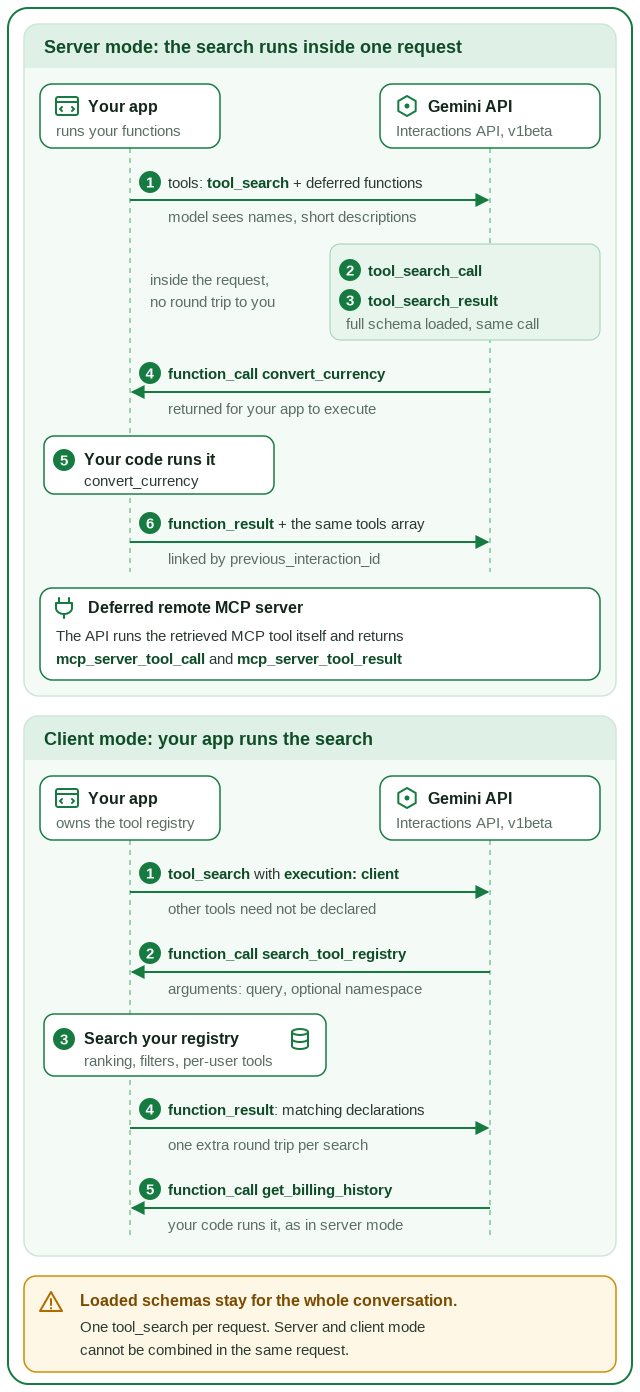
The figure shows the two ways the Gemini API offers this. Follow the numbers in each panel: the difference is who runs the search, and how many round trips it costs.
What tool retrieval is#
The pattern does not depend on one vendor: give the model a cheap index of your tools, a way to search it, and the full schema only when it asks. You can build that on any function-calling API. What is new is a provider running it inside the API.
On 19 November 2026 Google added tool retrieval to the Gemini API, labelled Preview. It works on the Interactions API with the v1beta API version only, not on generateContent, and the guide warns that the API surface may change before general availability.
Two fields carry the feature. defer_loading: true on a function or a remote MCP server withholds its schema, and a tool of type tool_search lets the model search. The release notes list Gemini 3.6 and later, including all Gemini 4 models; the guide has the exact model ids.
How it works#
Server mode is the default. Add {"type": "tool_search"} to the tools array and set defer_loading: true on the tools to withhold. The model sees the name and description of each deferred tool, or its short_description when set. When it needs a tool, it emits a tool_search_call with the function names it wants, the API answers with a tool_search_result holding the full schema, and the model produces a normal function_call. You only execute the function_call; the rest happens inside one request.
defer_loading: true on an mcp_server entry defers every tool that remote MCP server exposes. When the model retrieves and calls one, the API runs it on the server and returns mcp_server_tool_call and mcp_server_tool_result steps in the same response.
Client mode moves the search to your code. You declare a tool_search tool with execution: "client", a name, a description and your own parameters. The model calls it like any function; you run your lookup and return complete function declarations in the function_result. Those tools need not be in the initial tools array, so you can add tools during a conversation, per user if needed. The price is one extra round trip per search.
Rules for both modes:
- One
tool_searchentry per request, and no mixing of modes.defer_loadingworks with server mode only. - Send the full tools array on every request; the API does not keep it between turns.
- Loaded tools stay in context for the rest of the conversation.
- With
store=false, keep thetool_search_callandtool_search_resultsteps in order with theirsignatureunchanged. A missing call or signature returns a 400 error; a missing result silently drops the loaded schemas.
What it costs#
Tool retrieval has no separate charge; tokens are billed at the model's normal rates. From the pricing section of the guide, as of 28 November 2026:
- A deferred tool adds only its name and
short_description(or the first sentence of its description) tototal_input_tokens. A schema is not billed until loaded. - Each server-side search is an extra model call inside the request, with the full context plus the loaded schemas. Those prompt tokens appear in
total_tool_use_tokens, billed at the input rate. - Retrieved schemas are appended rather than changing the prompt prefix, so implicit caching keeps working. A smaller prompt can fall below the minimum cacheable size, though.
The guide's own conclusion: with a small library, or a long context that searches on every turn, static loading can cost less.
Where it is useful, and where not#
Useful:
- Large tool libraries where a request uses a few tools, such as agents in front of many back-end services.
- Several MCP servers. A deferred
mcp_serverentry keeps its tool list out of every prompt. - Per-user tools. In client mode your registry decides what a user may see.
Not a good fit:
- Fewer than about 20 stable tools. The guide's comparison table recommends static loading there.
- Tools that almost every turn needs. Keep those loaded and defer the long tail.
- Tools named in your system instructions or tool outputs. The model may call them without searching first, which can end in an error for a deferred tool (see the guide's common errors).
- Latency-critical paths in client mode. Every search is a round trip through your app.
Example: a client-side search in Python#
The script builds a synthetic registry of 48 tools, compares three payloads and answers one search call the way an app would in client mode. It calls no model and needs no key. The ranking is plain word overlap; a real registry would use better retrieval, but the answer has the shape the guide asks for: complete declarations as JSON objects. I ran it with Python 3.12.14, standard library only.
"""Client-side tool search over a local registry. Python 3.12, standard library only.

The registry is synthetic: 8 services x 6 operations = 48 function declarations.
No model is called. The script compares payload sizes and runs one search.
"""
import json
import re

SERVICES = {
    "billing": "invoices, payments and refunds",
    "crm": "customers, contacts and accounts",
    "calendar": "meetings and availability",
    "tickets": "support tickets and their status",
    "inventory": "stock levels and warehouses",
    "shipping": "shipments and tracking events",
    "hr": "employees and leave requests",
    "docs": "documents and folders",
}
OPERATIONS = {
    "list": "List {what}, filtered by date range and status.",
    "get": "Get one record of {what} by its id.",
    "create": "Create a new record of {what}.",
    "update": "Update fields of an existing record of {what}.",
    "search": "Full-text search over {what}.",
    "history": "Return the change history of one record of {what}.",
}
PARAMS = {
    "record_id": {"type": "string", "description": "Identifier of the record."},
    "from_date": {"type": "string", "description": "Start of the range, ISO 8601 date."},
    "to_date": {"type": "string", "description": "End of the range, ISO 8601 date."},
    "status": {"type": "string", "enum": ["open", "closed", "all"],
               "description": "Filter on status. Default all."},
    "page_size": {"type": "integer", "description": "Maximum number of results, 1 to 100."},
    "fields": {"type": "array", "items": {"type": "string"},
               "description": "Fields to return. Default all fields."},
}


def declaration(service, op):
    return {
        "type": "function",
        "name": f"{service}_{op}",
        "description": OPERATIONS[op].format(what=SERVICES[service])
        + " Requires the caller to hold read access to the service.",
        "parameters": {"type": "object", "properties": PARAMS,
                       "required": ["record_id"] if op in ("get", "update", "history") else []},
    }


REGISTRY = [declaration(s, op) for s in SERVICES for op in OPERATIONS]

SEARCH_TOOL = {
    "type": "tool_search",
    "execution": "client",
    "name": "search_tool_registry",
    "description": "Search the tool registry. Namespaces: " + ", ".join(SERVICES) + ".",
    "parameters": {"type": "object", "required": ["query"], "properties": {
        "query": {"type": "string", "description": "Capability to look for."},
        "namespace": {"type": "string", "description": "Optional service filter."}}},
}


def words(text):
    return {w.rstrip("s") for w in re.findall(r"[a-z]+", text.lower())}


def search(query, namespace=None, k=3):
    """Rank declarations by words shared with the query, best first."""
    wanted = words(query)
    scored = []
    for decl in REGISTRY:
        if namespace and not decl["name"].startswith(namespace + "_"):
            continue
        score = len(wanted & words(decl["name"] + " " + decl["description"]))
        if score:
            scored.append((score, decl["name"], decl))
    scored.sort(key=lambda item: (-item[0], item[1]))
    return scored[:k]


def size(obj):
    return len(json.dumps(obj, separators=(",", ":")))


print(f"registry: {len(REGISTRY)} functions in {len(SERVICES)} services")
print(f"static loading, all schemas:         {size(REGISTRY):>6,} characters of JSON")
# Without a short_description, a deferred tool shows its name and first sentence.
deferred = [{"name": d["name"], "summary": d["description"].split(". ")[0]} for d in REGISTRY]
print(f"deferred, names and first sentences: {size(deferred):>6,} characters")
print(f"client mode, search tool only:       {size(SEARCH_TOOL):>6,} characters")

# The model calls search_tool_registry. Your app runs the search and answers it.
call = {"name": "search_tool_registry", "id": "call_1",
        "arguments": {"query": "get shipment tracking"}}
hits = search(**call["arguments"])
print(f'\nsearch "{call["arguments"]["query"]}":')
for score, name, _ in hits:
    print(f"  score {score}  {name}")

function_result = {"type": "function_result", "name": call["name"], "call_id": call["id"],
                   "result": [decl for _, _, decl in hits]}
print(f"\nfunction_result with {len(hits)} declarations: {size(function_result):,} characters")
print("next request: same tools array, previous_interaction_id, this function_result as input")
The output of python3.12 -I tool_search.py, run on 28 November 2026:
registry: 48 functions in 8 services
static loading, all schemas:         36,833 characters of JSON
deferred, names and first sentences:  4,697 characters
client mode, search tool only:          395 characters

search "get shipment tracking":
  score 3  shipping_get
  score 2  shipping_create
  score 2  shipping_history

function_result with 3 declarations: 2,399 characters
next request: same tools array, previous_interaction_id, this function_result as input
For this synthetic registry, deferring cuts the tool payload about eight times. The second line only approximates server mode: the guide says a deferred tool without a short_description costs its name and the first sentence of its description, but does not publish the exact format. Client mode sends almost nothing up front. A search is not free either: the returned declarations are input on the next turn and stay in context. Characters are not tokens; the ratio is the point.
In server mode you write no search code. This is the request shape from the official guide, reduced to one deferred tool. I did not run it here, because it needs an API key:
curl -X POST "https://generativelanguage.googleapis.com/v1beta/interactions" \
  -H "x-goog-api-key: $GEMINI_API_KEY" \
  -H 'Content-Type: application/json' \
  -d '{
    "model": "gemini-4-hydrogen",
    "input": "Convert 100 USD to EUR.",
    "tools": [
      {"type": "tool_search"},
      {
        "type": "function",
        "name": "convert_currency",
        "description": "Convert an amount from one currency to another.",
        "defer_loading": true,
        "parameters": {
          "type": "object",
          "properties": {
            "amount": {"type": "number"},
            "from_currency": {"type": "string"},
            "to_currency": {"type": "string"}
          },
          "required": ["amount", "from_currency", "to_currency"]
        }
      }
    ]
  }'
The guide's sample response holds three steps: tool_search_call with function_names: ["convert_currency"], tool_search_result with the full schema, and the function_call with the arguments. Check steps for a function_call on every response; the guide notes that status is not always requires_action when one is returned.
Pros, cons and limits#
| Aspect | Details |
|---|---|
| Pros | Smaller prompts for large tool libraries. Server mode needs no search code and no extra round trip. Works for remote MCP servers. Client mode supports per-user tool sets. No separate charge. |
| Cons | Preview on v1beta; the API can change. Interactions API only. Each server-side search is an extra model call. Client mode adds a round trip per search. |
| Limits | One tool_search per request. Loaded tools cannot be unloaded. A search with no match returns text, not a structured error. The model may search several times in one turn. |
| Lock-in | Field names and step types are Gemini-specific. A client-side registry with your own search is portable; only the wiring changes. |
When to use it#
Use server mode for a large, known tool library or several MCP servers where most requests touch a few tools. Keep the core tools loaded, defer the long tail, and prefix similar tools by service, such as billing_get_customer and crm_get_customer, as the guide recommends. Use client mode when the tool set depends on the user and you can afford the extra round trip.
Stay with static loading for a small, stable set of tools, and wait for general availability if you cannot absorb API changes. Next step: read the tool retrieval guide (opens in a new tab), then compare total_tool_use_tokens with your current prompt size on real traffic.