

Your support agent runs in Microsoft Foundry. The stock information it needs sits with a supplier, behind an agent the supplier built on its own platform. Without protocol support you would wrap the supplier's agent as a plain API tool and lose its task model, or write glue code for its protocol. With the A2A tool in Foundry Agent Service, the supplier's agent becomes one more tool on your Foundry agent. The model decides when to call it, Foundry reads the remote agent card, sends the message over Agent2Agent (A2A) 1.0, and gets a task back.
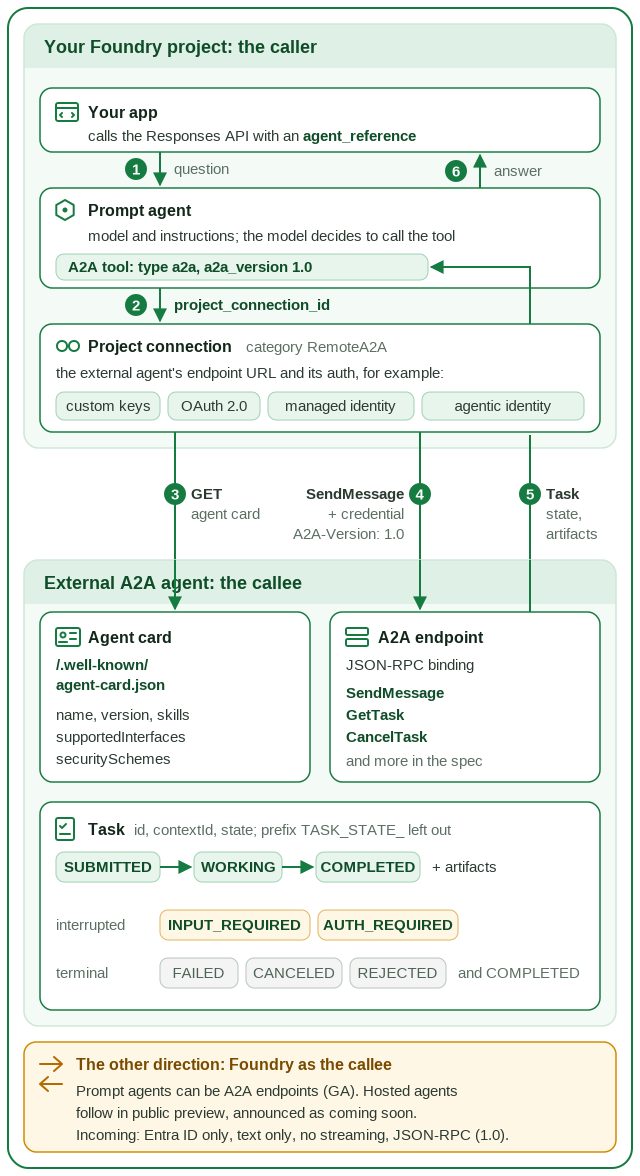
The figure shows that call from end to end. Follow the numbers: steps 1 and 2 happen inside your Foundry project, steps 3 to 5 cross to the other platform, and step 6 returns the answer to your app.
What was released#
On 18 November 2026, at Ignite, Microsoft announced that the A2A tool in Foundry Agent Service is generally available. The companion post on tools and toolboxes and the documentation add the details that matter for planning:
- The A2A tool is GA. A Foundry agent can delegate work to another Foundry agent or to any external agent that speaks A2A.
- A2A 1.0. The GA tool and the A2A endpoints use the stable 1.0 version of the protocol. The older
a2a_previewtool type stays in preview for A2A 0.3. - The other direction. A2A endpoints, which expose a Foundry agent to other A2A clients, are GA on prompt agents. On hosted agents they are announced as public preview, "coming soon", without a date.
- Tool policy is in preview. An approved-tools policy for agents and toolboxes, enforced through Azure Policy.
A2A itself is an open protocol for agent-to-agent calls. Version 1.0.0 of the specification was released on 12 March 2026. As of 28 November 2026 the latest release on GitHub (opens in a new tab) is v1.0.1, and a v1.1.0 release candidate is tagged.
How the call works#
Four pieces take part. You configure the first two; the remote agent publishes the other two.
- The A2A tool. A tool of type
a2awitha2a_versionset to1.0on a prompt agent. The model sees it like any other tool and decides when to call it. - The project connection. A connection of category
RemoteA2Athat holds the remote endpoint and the credential. Options include custom keys sent as a header, OAuth 2.0, the project managed identity and an agentic identity. The credential stays in the connection, not in the agent definition. - The agent card. A JSON document at
/.well-known/agent-card.jsonon the remote side. It names the agent, its skills, its supported interfaces (URL, binding and protocol version) and its security schemes. - The task. A
SendMessagecall usually returns a task (the specification also allows a direct message) with an id, acontextId, a state and, when it is done, artifacts. In A2A 1.0 the states are SCREAMING_SNAKE values such asTASK_STATE_COMPLETED. Two states are interrupted rather than final:TASK_STATE_INPUT_REQUIREDandTASK_STATE_AUTH_REQUIRED. For input, the client answers on the same task id.
A2A 1.0 also defines a version header. The specification says clients must send it, A2A-Version: 1.0 for this version, and servers must treat an empty value as 0.3. This detail has a practical side, covered under the limits.
Where it helps, and where it does not#
Useful:
- Agents owned by another team or company. A partner exposes an A2A agent; you connect to it without sharing code or a runtime.
- Mixed platforms. One agent runs in Foundry, another on a different cloud or framework. A2A is the contract between them.
- Long or interactive work. A task can pause in
INPUT_REQUIREDand continue, which a plain function call cannot express. - Shared credentials. Through a toolbox, the A2A tool and its credential are versioned once and reused by several agents.
Not a good fit:
- A deterministic API. If the other side is a service with a fixed schema, an OpenAPI or MCP tool is simpler and cheaper than an agent hop with a model on both ends.
- Files, images or streaming. For Foundry agent targets and for incoming calls, the documentation lists text only and no streaming.
- Latency-critical paths. Every A2A call adds a network round trip plus the remote agent's own model calls.
Example: a minimal A2A agent and its client#
To see what crosses the wire in steps 3 to 5, the script below runs both sides of an A2A 1.0 call on loopback. It is the kind of external agent a RemoteA2A connection points to, reduced to a stub: no model, a dictionary of stock levels, and one skill. The client part does what an A2A client does: read the card, pick the first JSON-RPC 1.0 interface, send a message, answer when the task asks for input.
I ran it with Python 3.12.14 and the standard library only.
"""A minimal A2A 1.0 agent (JSON-RPC binding) and the calls a client makes to it.

Standard library only. The agent's logic is a stub: no model, no network beyond loopback.
"""
import json
import threading
import urllib.request
import uuid
from http.server import BaseHTTPRequestHandler, ThreadingHTTPServer

BASE = "http://127.0.0.1:8712"
STOCK = {"KB-204": 37, "KB-310": 0}
TASKS = {}

CARD = {
    "name": "Supplier stock agent",
    "description": "Answers stock questions for the supplier's catalogue.",
    "version": "1.0.0",
    "supportedInterfaces": [
        {"url": f"{BASE}/a2a", "protocolBinding": "JSONRPC", "protocolVersion": "1.0"}],
    "capabilities": {"streaming": False, "pushNotifications": False},
    "defaultInputModes": ["text/plain"],
    "defaultOutputModes": ["text/plain"],
    "skills": [{"id": "stock-check", "name": "Stock check",
                "description": "Units in stock for a product code.",
                "tags": ["inventory"], "examples": ["How many KB-204 are in stock?"]}],
}


def handle_send(params):
    msg = params["message"]
    text = " ".join(p["text"] for p in msg["parts"] if "text" in p)
    task = TASKS.get(msg.get("taskId")) or {
        "id": str(uuid.uuid4()), "contextId": msg.get("contextId") or str(uuid.uuid4()),
        "artifacts": []}
    TASKS[task["id"]] = task
    sku = next((w.strip("?.,") for w in text.split() if w.strip("?.,") in STOCK), None)
    if sku is None:
        reply = {"role": "ROLE_AGENT", "messageId": str(uuid.uuid4()),
                 "parts": [{"text": "Which product code?"}]}
        task["status"] = {"state": "TASK_STATE_INPUT_REQUIRED", "message": reply}
    else:
        task["status"] = {"state": "TASK_STATE_COMPLETED"}
        task["artifacts"] = [{"artifactId": "stock", "name": "stock-level",
                              "parts": [{"text": f"{sku}: {STOCK[sku]} units in stock"}]}]
    return {"task": task}


class Agent(BaseHTTPRequestHandler):
    def log_message(self, *args):
        pass

    def send(self, status, body):
        data = json.dumps(body).encode()
        self.send_response(status)
        self.send_header("Content-Type", "application/json")
        self.end_headers()
        self.wfile.write(data)

    def do_GET(self):
        if self.path == "/.well-known/agent-card.json":
            return self.send(200, CARD)
        self.send(404, {})

    def do_POST(self):
        req = json.loads(self.rfile.read(int(self.headers["Content-Length"])))
        if self.headers.get("A2A-Version") != "1.0":
            return self.send(200, {"jsonrpc": "2.0", "id": req["id"], "error": {
                "code": -32009, "message": "VersionNotSupportedError"}})
        if req["method"] != "SendMessage":
            return self.send(200, {"jsonrpc": "2.0", "id": req["id"], "error": {
                "code": -32601, "message": "Method not found"}})
        self.send(200, {"jsonrpc": "2.0", "id": req["id"], "result": handle_send(req["params"])})


def call(url, method, params, rpc_id):
    body = json.dumps({"jsonrpc": "2.0", "id": rpc_id, "method": method, "params": params})
    req = urllib.request.Request(url, body.encode(), {
        "Content-Type": "application/json", "A2A-Version": "1.0"})
    with urllib.request.urlopen(req) as resp:
        return json.load(resp)["result"]["task"]


def message(text, task=None):
    msg = {"role": "ROLE_USER", "messageId": str(uuid.uuid4()), "parts": [{"text": text}]}
    if task:
        msg["taskId"], msg["contextId"] = task["id"], task["contextId"]
    return {"message": msg}


server = ThreadingHTTPServer(("127.0.0.1", 8712), Agent)
threading.Thread(target=server.serve_forever, daemon=True).start()

# 1. Discover: read the agent card and pick the first JSON-RPC 1.0 interface.
with urllib.request.urlopen(f"{BASE}/.well-known/agent-card.json") as resp:
    card = json.load(resp)
iface = next(i for i in card["supportedInterfaces"]
             if i["protocolBinding"] == "JSONRPC" and i["protocolVersion"] == "1.0")
print("card:", card["name"], "| skill:", card["skills"][0]["id"], "| endpoint:", iface["url"])

# 2. Send a message. The agent needs more input, so the task pauses.
task = call(iface["url"], "SendMessage", message("Is the keyboard in stock?"), 1)
print("task", task["id"][:8], task["status"]["state"], "|", task["status"]["message"]["parts"][0]["text"])

# 3. Answer on the same task. The task completes with an artifact.
task = call(iface["url"], "SendMessage", message("KB-204", task), 2)
print("task", task["id"][:8], task["status"]["state"], "|", task["artifacts"][0]["parts"][0]["text"])
server.shutdown()
Run it:
python3.12 a2a_remote_agent.pyThe output of a run on 28 November 2026. The task id is random:
card: Supplier stock agent | skill: stock-check | endpoint: http://127.0.0.1:8712/a2a
task 2367f7a2 TASK_STATE_INPUT_REQUIRED | Which product code?
task 2367f7a2 TASK_STATE_COMPLETED | KB-204: 37 units in stock
Three things to notice:
- The card drives the call. The client takes the endpoint from
supportedInterfaces, not from configuration. The specification says the first entry is the preferred one. - One task, two messages. The second message carries the
taskIdandcontextIdof the first, so the agent continues the same task instead of starting a new one. - The result is wrapped. The JSON-RPC result is
{"task": {...}}, because aSendMessageresponse holds either a task or a message.
This stub has no authentication and listens on plain HTTP on loopback. A production agent uses HTTPS and declares its authentication in securitySchemes. The auth type of the RemoteA2A connection must match it. Foundry fetches the agent card anonymously unless you set send_credentials_for_agent_card to true in the tool definition.
Connecting it from Foundry#
On the Foundry side you create the connection and add the tool. In the portal: Tools, Connect tool, the Custom tab, Agent2Agent (A2A) and Create, then a name, the A2A agent endpoint and an authentication method. Creating the connection needs the Foundry Project Manager role; creating and testing the agent needs Foundry User.
The Python below is adapted from the official documentation and was not run here, because it needs a Foundry project. It uses azure-ai-projects 2.5.0 or later. I removed the comments, the cleanup call and tool_choice="required" (so the model decides when to call the tool), and replaced the model name with a placeholder.
from azure.identity import DefaultAzureCredential
from azure.ai.projects import AIProjectClient
from azure.ai.projects.models import A2AProtocolVersion, A2ATool, PromptAgentDefinition

project = AIProjectClient(
    endpoint="https://<resource>.ai.azure.com/api/projects/<project>",
    credential=DefaultAzureCredential(),
)
client = project.get_openai_client()

connection = project.connections.get("supplier-stock-a2a")
tool = A2ATool(a2a_version=A2AProtocolVersion.V1_0, project_connection_id=connection.id)

agent = project.agents.create_version(
    agent_name="support-agent",
    definition=PromptAgentDefinition(
        model="<your-model-deployment>",
        instructions="Answer stock questions with the supplier stock agent.",
        tools=[tool],
    ),
)

response = client.responses.create(
    input="Is KB-204 in stock?",
    extra_body={"agent_reference": {"name": agent.name, "type": "agent_reference"}},
)
print(response.output_text)
The documentation recommends adding the A2A tool through a toolbox for most agents. A toolbox exposes its tools through one managed MCP endpoint, so several agents, including agents outside Foundry, reuse the same A2A tool and credential.
Pros, cons and limits#
| Aspect | Details |
|---|---|
| Maturity | The A2A tool and A2A 1.0 are GA. Prompt agents as A2A endpoints are GA. Hosted agents as A2A endpoints and tool policy are preview. |
| Lock-in | Low on the wire: A2A is an open specification, and the remote agent can run anywhere. The configuration (connections, toolboxes, roles) is Foundry-specific. |
| Version traps | The documentation notes that the current Azure Developer CLI toolbox flow still creates the preview a2a_preview tool for A2A 0.3. For incoming calls, Foundry serves 0.3 when the request sets no version. Set A2A-Version: 1.0 explicitly. |
| Content | For Foundry agent targets and incoming calls: text only, no streaming, and JSON-RPC as the only binding for 1.0. |
| Security | Incoming calls need Microsoft Entra ID; keys and anonymous access are not supported. Callers need the Foundry Agent Consumer role or higher. Outgoing credentials live in the project connection. |
| Data | For Foundry agent targets, A2A tasks and contexts are kept for 60 days from the most recent write. |
| Cost | Two models work on one request: yours and the remote agent's. Budget for both, and for the extra round trips. |
When to use it#
Use the A2A tool when the other side is a real agent that you do not own or do not want to host: a partner's agent, another team's agent on another platform, or a Foundry agent in another project. Keep MCP or OpenAPI tools for plain services. If you also want to expose your own Foundry agents, start with prompt agents; hosted agents have no A2A endpoint until the preview arrives.
Next step: read the A2A tool page (opens in a new tab) for the connection and authentication options, and the incoming A2A page (opens in a new tab) before you expose an agent yourself.