

Running a capable coding model on a laptop usually means a choice: a small dense model, or a larger model squeezed by aggressive quantization after training. Both cost quality. Inkling 2 Mini takes another route. Most of its expert weights, which hold most of its parameters, were trained in 4-bit precision and ship that way, about 20 GB for 26.4B parameters, and it gets extra depth without extra weights by running the middle 12 of its 24 layers three times per token. By the vendor's figures it runs on an Apple silicon machine with 32 GB of memory:
ollama run inkling-2-mini:26b-a5b-nvfp4Thinking Machines Lab released it on 20 November 2026 with open weights under Apache 2.0. What follows is what looping means for memory, speed and context on your own hardware, how to run it, and where it falls short.
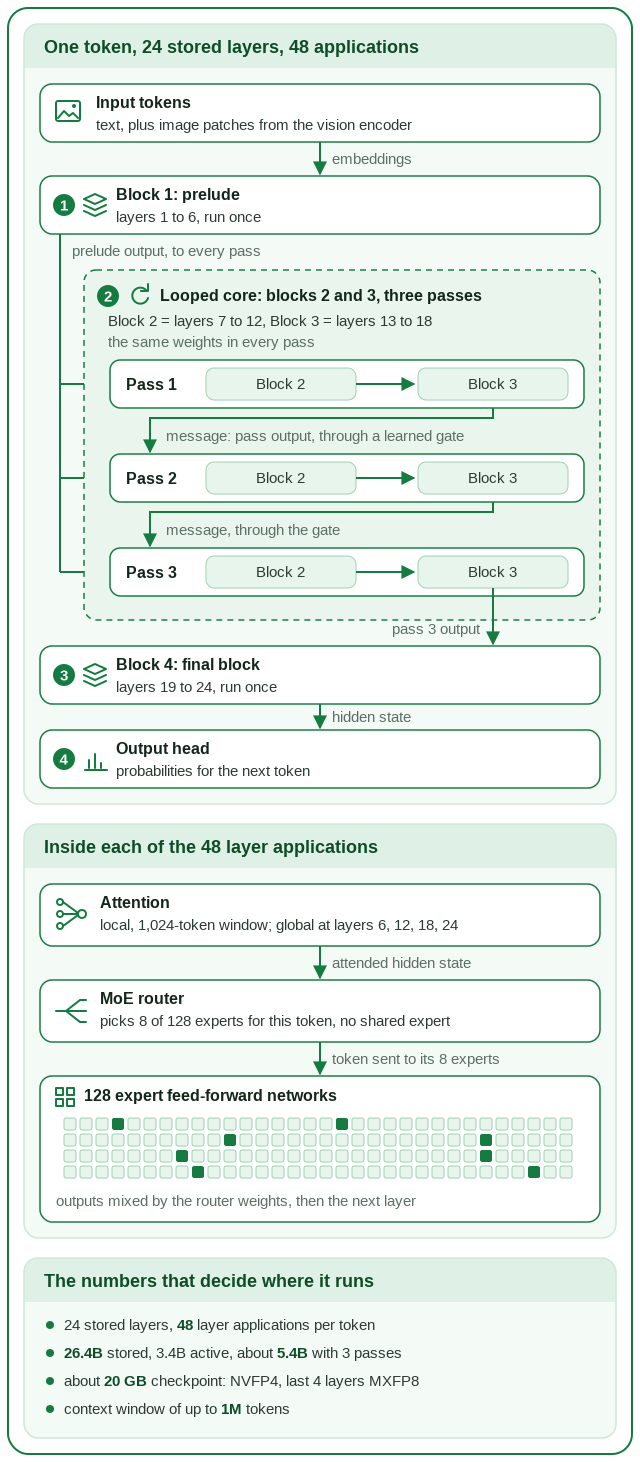
The figure follows one token through the model, from the numbered steps of the top panel to what happens inside each of the 48 layer applications.
What Inkling 2 Mini is#
Inkling 2 Mini is a multimodal model: text and images in, text out. It is a decoder-only transformer of 24 layers with mixture-of-experts (MoE) feed-forward layers. Each layer has 128 experts, and each token is routed to 8 of them. The model has 26.4B parameters in total and 3.4B active for a single pass through its layers. Each extra pass through the looped layers adds about 1.0B, so with three passes the model card counts 5.4B effective active parameters per token. The context window goes up to 1M tokens.
The expert weights were trained and ship in low precision: NVFP4 (4-bit) in the first 20 layers, MXFP8 (8-bit) in the last 4. Attention, the router, the embedding and the output projection stay BF16, per the checkpoint's quantization config (opens in a new tab). Because the deployed precision is the training precision, the announcement notes, there is no conversion loss from quantizing afterwards.
Alongside it, Thinking Machines released a research variant, TML-d24-varloop-research, trained to run one to five passes instead of a fixed three.
How a looped model works#
A standard transformer runs every layer once per token. A looped transformer runs some of its layers more than once, with the same weights each time, so the model does more computation per token without storing more parameters.
Inkling 2 Mini groups its 24 layers into four blocks of six:
- Block 1, the prelude (layers 1 to 6), runs once.
- Blocks 2 and 3 (layers 7 to 18) run three times.
- Block 4 (layers 19 to 24) runs once.
That is 6 + 36 + 6 = 48 layer applications per token from 24 stored layers. Why the middle: the announcement reasons that those layers carry the more abstract work, while the first and last layers translate between embeddings and internal representations. In the vendor's experiments, looping the middle 12 layers beat looping the last 12 on 27 of 28 evaluations.
Two connections tie the passes together. Every pass reads the output of the prelude. The second and third passes also read the previous pass's output, called the message, through a gate that is learned in training.
The attention is hybrid: 20 layers use local attention with a 1,024-token sliding window, and layers 6, 12, 18 and 24 use global attention, so every block ends with a global layer. (config.json counts layers from 0, so it lists the global layers as 5, 11, 17 and 23.)
Inkling 2 Mini is trained and supported for three passes only. Trading depth for speed per request is what the research variant is for.
Memory and speed#
Two numbers decide whether a model runs well on your machine:
- Memory is set by the total parameter count. The router picks experts per token, so all 128 experts of every layer must stay resident.
- Decode speed at batch size one is bound by how many bytes of weights are read per generated token. For an MoE that is the active weights, and a looped model reads the looped layers again on every pass.
The announcement's speed chart uses exactly this method: a theoretical ceiling at 614 GB/s of memory bandwidth, BF16 weights, batch size one, including the repeated reads across loops. The script below applies that arithmetic to the published figures, in BF16 and as shipped. It needs no download or packages; I ran it with Python 3.12.14.
"""Inkling 2 Mini: layer schedule and memory arithmetic from the published figures."""

PASSES = 3
PRELUDE = range(1, 7)       # block 1, runs once
CORE = range(7, 19)         # blocks 2 and 3, shared weights, run PASSES times
CODA = range(19, 25)        # block 4, runs once
GLOBAL = {6, 12, 18, 24}    # global attention; the other 20 layers use a 1,024-token window

schedule = [*PRELUDE, *[layer for _ in range(PASSES) for layer in CORE], *CODA]
print(f"stored layers: 24, layer applications per token: {len(schedule)}")
print(f"global-attention applications per token: {sum(l in GLOBAL for l in schedule)}")

TOTAL = 26.4e9                          # all parameters, every expert
ACTIVE = 3.4e9                          # active parameters with a single pass
EFFECTIVE = ACTIVE + 1.0e9 * (PASSES - 1)  # each extra pass adds about 1.0B
print(f"effective active parameters: {EFFECTIVE / 1e9:.1f}B")

# As shipped: experts in NVFP4 (layers 1-20) or MXFP8 (21-24), the rest in BF16.
EXPERTS = 128 * 3 * 2304 * 1152  # expert weights per layer, from config.json
FORMAT = {l: 0.5 + 1 / 16 if l <= 20 else 1 + 1 / 32 for l in range(1, 25)}  # bytes/weight
OTHER = {l: 59.2e6 if l in CORE else 54.5e6 for l in range(1, 25)}  # BF16 attention, router, norms
VOCAB = 201024 * 2304 * 2        # BF16 embedding; the output projection is the same size
resident = sum(EXPERTS * FORMAT[l] + OTHER[l] for l in range(1, 25)) + 2 * VOCAB
read = sum(EXPERTS * FORMAT[l] * 8 / 128 + OTHER[l] for l in schedule) + VOCAB  # 8 of 128 experts

BANDWIDTH = 614  # GB/s, the figure the announcement uses for its speed ceiling
for label, weights, per_token in [
    ("all BF16", TOTAL * 2, EFFECTIVE * 2),  # the announcement's method
    ("as shipped", resident, read),
]:
    print(f"{label}: {weights / 1e9:.1f} GB weights, {per_token / 1e9:.2f} GB/token, "
          f"max {BANDWIDTH / (per_token / 1e9):.0f} tokens/s")
The output of python3.12 loop_budget.py on 28 November 2026:
stored layers: 24, layer applications per token: 48
global-attention applications per token: 8
effective active parameters: 5.4B
all BF16: 52.8 GB weights, 10.80 GB/token, max 57 tokens/s
as shipped: 18.9 GB weights, 5.55 GB/token, max 111 tokens/s
All inputs are published: parameter counts from the model card, shapes from config.json, precisions from the quantization config, and the BF16 sizes outside the experts from the checkpoint's tensor list. The max values are ceilings from arithmetic, not measurements: the KV cache, activations and runtime overhead are left out, and 614 GB/s is the announcement's assumption, not the bandwidth of every 32 GB machine. What they show:
- BF16 would not fit. 52.8 GB of weights is out of reach for a 32 GB machine; the low-precision experts are what make the laptop target possible. With the vision encoder and the draft head, the 18.9 GB of the language model becomes the 20 GB checkpoint.
- Looping costs bandwidth. Per token the model reads weights as if it had 5.4B active parameters, not 3.4B, as the model card says. That is about 5.55 GB, not the 2.7 GB of 5.4B weights at 4 bits: two thirds of it is BF16, because the looped layers reread their attention weights on every pass and the output projection alone is 0.93 GB.
How much context you really get#
1M tokens is the model's limit, not your laptop's. The vLLM recipe (opens in a new tab) states that each pass keeps its own KV cache. As an illustration: a global layer has 8 key-value heads of 128 dimensions, so a BF16 cache holds 4 KiB per token for each global application. With 8 global applications per token that is 32 KiB per token, or 32 GiB for 1M tokens, before the small caches of the local layers. That does not fit beside 20 GB of weights on a 32 GB machine.
The runtime guides show the same limit. The vLLM recipe caps the context at 262,144 tokens on H100 and DGX Spark. The SGLang cookbook (opens in a new tab) caps it at 65,536 tokens on an RTX 5090 with 32 GB. Plan for tens of thousands of tokens on a 32 GB device, not a million.
Where it is useful, and where not#
Useful:
- Local agentic coding and tool use when code or data must stay on the machine. The vendor reports 48.2% on DeepSWE v1.1 and 79.2% on SWE-bench Verified (bash only), ahead of every other model in its comparison table. These are the vendor's own numbers, and evaluation setups vary by model.
- Search-heavy work. It leads the vendor's table on BrowseComp and DeepSearchQA (both with context compaction) and on MCP Atlas, which suits an agent that looks facts up instead of recalling them.
- Documents and screens. Reported 92.8% on OmniDocBench v1.6 and 76.5% on ScreenSpot Pro in its original setting, without Python.
- Research on looped models, together with the variable-loop variant.
Not a good fit:
- Knowledge questions without retrieval. Looping adds computation, not stored knowledge. The card names factual recall as the largest gap against the larger Inkling 2 Small and warns that the model states wrong answers with confidence.
- Long multi-turn chat and instructions with many constraints. The announcement reports 50.0% on MultiChallenge, behind Qwen3.8-27B. On ComplexConstraints v1.1 its table shows 33.4%, behind Muse Glimmer at 35.6%.
- Unattended agents. The card warns that the model can get stuck in long reasoning loops and may delete or overwrite files without confirmation. It recommends limits on output tokens and agent turns, and a sandbox.
- Languages other than English, where the card reports lower output quality.
How to run it#
The model card lists the hardware: Apple silicon with 32 GB or more, an NVIDIA DGX Spark, or another GPU with 32 GB or more of VRAM recommended. It links a guide per runtime, among them vLLM, SGLang, TokenSpeed, Unsloth and Ollama; llama.cpp and Unsloth serve quantized GGUF versions.
I did not run the commands below: each needs the 20 GB download. They come from the runtime guides linked from the card.
On a Mac, Ollama is the shortest path: the ollama run command from the opening. Name the tag: 26b-a5b-nvfp4 is the MLX package with the vendor's weights unchanged, its tensor bytes within 2 KB of the checkpoint. As of 28 November 2026 the plain name (latest on the tags page (opens in a new tab)) resolves to 26b-a5b-iq4_NL, a 19.02 GB package whose GGUF weights are quantized after training. Ollama v0.40.17 added the model for Apple silicon only, with PC support to follow, its release notes say. v0.40.18 and v0.40.19 add Inkling speedups and announce no PC support.
On an NVIDIA GPU, vLLM needs version 0.35.0, which the recipe marks as not yet released, so it installs a nightly wheel (built for CUDA 13.2):
uv venv
uv pip install -U vllm --torch-backend=auto \
  --extra-index-url https://wheels.vllm.ai/nightly
vllm serve thinkingmachines/Inkling-2-Mini \
  --tensor-parallel-size 1 \
  --reasoning-parser inkling \
  --speculative-config '{"method":"dspark","num_speculative_tokens":7,"draft_sample_method":"probabilistic"}'
The speculative config uses the draft head bundled in the checkpoint. The server speaks the OpenAI-compatible API on port 8000:
curl -X POST "http://localhost:8000/v1/chat/completions" \
  -H "Content-Type: application/json" \
  --data '{
    "model": "thinkingmachines/Inkling-2-Mini",
    "max_tokens": 2048,
    "messages": [
      {"role": "user", "content": "Write a Python function that parses ISO 8601 durations."}
    ]
  }'
The request is text only and sets max_tokens, following the card's advice to limit output tokens. SGLang has verified commands per GPU in its cookbook, from the lmsysorg/sglang:inkling-2-mini image, with --reasoning-parser inkling and --tool-call-parser inkling2.
Pros, cons and limits#
| Aspect | Details |
|---|---|
| Licence and lock-in | Open weights under Apache 2.0. Runs on several open runtimes, so no runtime lock-in. Tinker is the vendor's hosted option for inference and fine-tuning. |
| Strengths | Fits in about 20 GB in its trained precision, no quantization loss (checkpoint and 26b-a5b-nvfp4 package). Image input, strong vendor-reported coding and tool-use scores for its size. |
| Weaknesses | Weak on factual recall, multi-turn chat and constraint-heavy instructions. Compute per token is that of 5.4B active parameters, and the pass count is fixed. |
| Limits | Runtime support is new: vLLM needs a nightly build, and Ollama announced Apple silicon only in v0.40.17 and no PC support since. Usable context on 32 GB is far below 1M. Setting reasoning effort to its minimum does not fully disable reasoning. |
| Maturity | Released 20 November 2026, eight days old as of 28 November. The benchmark numbers are the vendor's own. |
When to choose it#
Choose Inkling 2 Mini when you want a local coding or tool-using agent on a 32 GB Mac or a single 32 GB GPU, under Apache 2.0, and you can give it search or retrieval for facts. Run your own evaluation on your own tasks before you rely on the benchmark table, cap output tokens and agent turns, and sandbox its tools, as the card recommends.
Look elsewhere for knowledge-heavy chat without retrieval or for very long contexts on small hardware. On a Windows or Linux PC, Ollama's release notes through v0.40.19 announce no support, although its library page also names a DGX Spark; otherwise use vLLM or SGLang on an NVIDIA GPU, or a GGUF quantization with llama.cpp, which is quantized after training and so gives up the no-conversion-loss advantage.
Next step: read the "Required hardware" and "Bias, risks and limitations" sections of the model card (opens in a new tab), then the guide for your runtime that the card links.