

Qwen3-30B-A3B quantized to 4 bits has about 15 GB of expert weights. On a 16 GB graphics card that leaves no room for the rest of the model or a KV cache. Until recently SGLang gave you two choices on such a machine: do not load the model, or load it with --cpu-offload-gb, which streams every offloaded weight to the GPU on every forward pass.
SGLang v0.5.23 adds a third: Paged Experts. In the project's own test on an RTX 5070 Ti with 16 GB, that model decodes a single stream at about 206 tokens per second with Paged Experts, against 16.6 with --cpu-offload-gb 3: about 12 times faster. The release notes say "up to 30x faster than CPU offload"; that figure is the FP8 version of the same model, 87.7 against 2.9 tokens per second. These are the project's measurements, not mine.
What Paged Experts is#
SGLang is an open-source serving framework for large language and multimodal models. Version v0.5.23 was published on GitHub on 2 November 2026 as a regular release, not a pre-release. Paged Experts is one of its headline items. It is opt-in: off unless you pass --enable-paged-experts.
The feature came in through two pull requests by the same author. #42557, merged on 19 October 2026, added the core for unquantized, FP8 and GPTQ experts. #45787, merged on 25 October 2026, added AWQ, compressed-tensors, MXFP4, NVFP4, W8A8 and block-INT8 experts.
The idea is the one an operating system uses for memory pages, applied to MoE experts. Each token is routed to only a few of the experts in a layer, and consecutive tokens reuse many of them. So the GPU holds a working set of experts per layer, host RAM holds all of them, and only the experts a step needs but does not have are copied over.
The release also adds TPU7x support through a separate plugin and LoRA adapters on FP8 and NVFP4 MoE models; both are out of scope here.
How it works#
Look at the top panel for where each part of the model lives, and at the numbered steps for what happens at one MoE layer during one decode step.
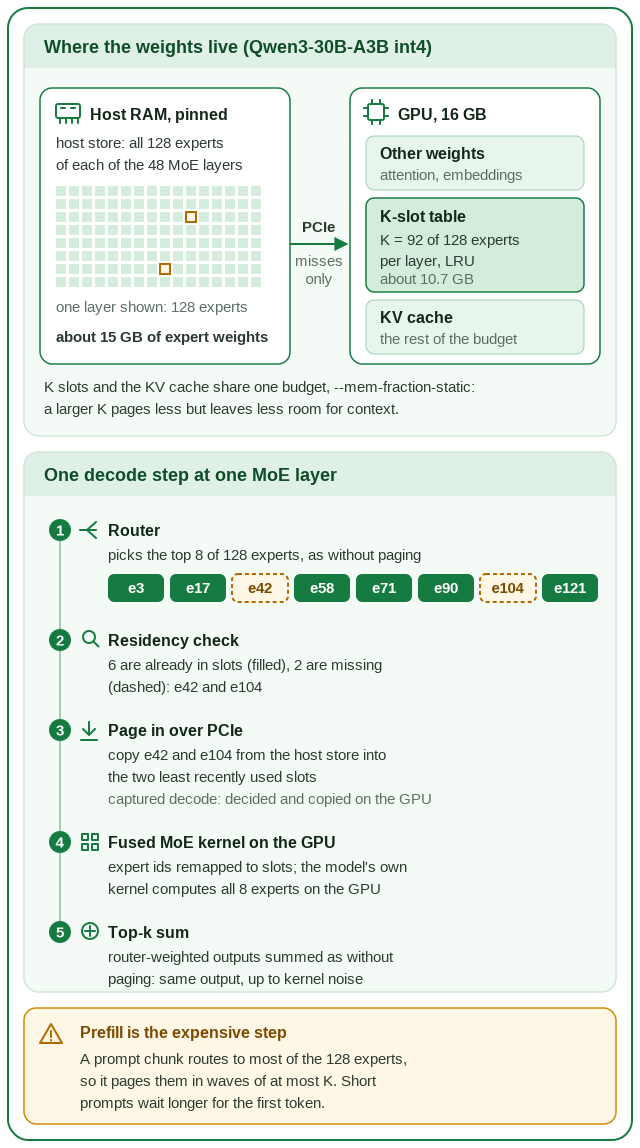
Each MoE layer keeps K of its E routed experts in a table of K slots on the GPU. A pinned (page-locked) host store holds all E experts of every layer. At every forward step of every MoE layer:
- The router runs over all E experts, exactly as without paging.
- The experts the step routes to are split into waves of at most K, the resident ones first. A decode step with a few requests needs one wave; a prefill chunk usually needs several.
- Missing experts are copied from the host store into the least recently used slots.
- The expert ids are remapped to slot numbers and the layer's own fused MoE kernel runs on the GPU.
- The router-weighted outputs go through the same top-k sum the kernel would do, so the result does not depend on how the experts were split.
Two points set it apart from other offloading:
- Computation stays on the GPU. Only storage is in host RAM.
--cpu-offload-gbstreams all offloaded weights every pass, and the expert offloading in llama.cpp (--n-cpu-moe) computes the offloaded experts on the CPU. - Results do not change. The documentation reports bit-identical logprobs for unquantized, FP8 and INT8 experts with
--enable-deterministic-inference. Formats on the Marlin kernel (GPTQ, AWQ, NVFP4, MXFP4) stay within that kernel's own run-to-run noise.
Decode CUDA graphs still work. When a step's routed entries fit in the K slots (up to K // top_k concurrent requests), the decision and the copy run on the GPU without a host sync, so the graph can capture them. Larger batches run without a graph.
Choosing K#
In v0.5.23 you set K yourself with --paged-experts-num-resident; the flag is required. K comes out of the same static memory budget as the KV cache (--mem-fraction-static): every slot you add is KV cache you lose. One resident expert per layer costs the size of one expert times the number of MoE layers.
The documentation gives the numbers for Qwen3-30B-A3B GPTQ-Int4: 2.43 MB per expert, 48 MoE layers, so about 117 MB per slot. On a 16 GB GPU it fits K = 92 of 128 with --mem-fraction-static 0.88 --max-total-tokens 10240. If the server cannot allocate its KV cache at startup, lower K. For more concurrency, lower K or use --kv-cache-dtype fp8.
Where it helps, and where it does not#
Useful:
- One consumer GPU with plenty of RAM. The pull request names the target: laptops and gaming PCs that pair 4 to 16 GB of VRAM with 32 to 64 GB of RAM.
- Single-user decode. One request at a time reuses its experts well, so few pages move per token.
- Long prompts. In the project's tests a 2,048-token prompt reached its first token sooner than with tuned llama.cpp, because the one-time page-in is a fixed cost and the GPU computes the tokens faster.
- Trading speed for context. A model that already fits can give up some resident experts for a longer KV cache, or to share the GPU with another model.
Not a good fit, by the project's own numbers and limits:
- Short prompts. A prefill touches nearly every expert, so the first token comes later than with llama.cpp: 89 against 68 ms on the 16 GB card in int4.
- Several requests with a small K. On an 8 GB laptop with K = 26 of 128, four concurrent requests reached 11 to 12 tokens per second against 41 for llama.cpp.
- Multi-GPU and speculative decoding. Tensor, expert, pipeline and data parallelism, EPLB and speculative decoding are rejected at startup.
- Limited pinnable memory. The whole host store must be pinnable. Under WSL2 that is about half of system RAM.
How to use it#
The launch command from the v0.5.23 documentation, for a single GPU. I did not run it here: it needs the model download and a CUDA GPU.
python -m sglang.launch_server \
  --model-path Qwen/Qwen3-30B-A3B-GPTQ-Int4 \
  --enable-paged-experts \
  --paged-experts-num-resident 92
For MXFP4 experts such as gpt-oss, and for ModelOpt NVFP4, add --moe-runner-backend marlin. Models with fused shared experts need --disable-shared-experts-fusion. Unsupported formats and runners are rejected at startup.
To get a feel for the trade-off between K and traffic over the PCIe link, the script below simulates the K-slot table of one layer in plain Python. The routing is synthetic: each token keeps about half of the previous token's experts and draws the rest from a skewed popularity. The shapes are those of Qwen3-30B-A3B GPTQ-Int4. The copy rate of 25 GB/s is an assumption, not a measurement, and on the low side for PCIe 5.0 x16: the pull request's figures imply about 50 GB/s on its test desktop.
"""Paged Experts in miniature: an LRU table of K expert slots for one MoE layer.

Synthetic routing, no GPU and no model. The shapes are those of
Qwen3-30B-A3B GPTQ-Int4: 128 experts per layer, top-8 routing,
48 MoE layers, 2.43 MB per expert.
"""
import random
from collections import OrderedDict

E, TOP_K, LAYERS, MB_PER_EXPERT = 128, 8, 48, 2.43
WARMUP, TOKENS = 200, 2000   # decode steps: not counted, then counted
LINK_GB_PER_S = 25           # assumed effective host-to-GPU copy rate


def route(rng, weights, previous):
    """TOP_K distinct experts: keep about half of the previous token's, draw the rest."""
    chosen = {e for e in previous if rng.random() < 0.5}
    while len(chosen) < TOP_K:
        chosen.add(rng.choices(range(E), weights)[0])
    return chosen


def page_ins_per_step(k, seed=7):
    rng = random.Random(seed)
    weights = [1 / (rank + 1) ** 0.8 for rank in range(E)]  # some experts are popular
    rng.shuffle(weights)
    slots, experts, misses = OrderedDict(), set(), 0
    for step in range(WARMUP + TOKENS):
        experts = route(rng, weights, experts)
        hits = [e for e in experts if e in slots]
        for e in hits:                      # mark resident experts as recently used
            slots.move_to_end(e)
        for e in experts.difference(hits):  # copy in the missing ones
            if len(slots) == k:
                slots.popitem(last=False)   # evict the least recently used slot
            slots[e] = True
            misses += step >= WARMUP
    return misses / TOKENS


print(f"{'K':>4} {'slots':>8} {'page-ins':>9} {'paged':>8} {'copy':>8} {'offload':>9}")
print(f"{'':>4} {'GB':>8} {'/layer':>9} {'MB/tok':>8} {'ms/tok':>8} {'MB/tok':>9}")
for k in (16, 26, 40, 64, 92, 128):
    per_layer = page_ins_per_step(k)
    paged_mb = per_layer * LAYERS * MB_PER_EXPERT
    offload_mb = (E - k) * LAYERS * MB_PER_EXPERT  # same bytes off the GPU, all streamed
    print(f"{k:>4} {k * LAYERS * MB_PER_EXPERT / 1000:>8.1f} {per_layer:>9.2f} "
          f"{paged_mb:>8.0f} {paged_mb / LINK_GB_PER_S:>8.1f} {offload_mb:>9.0f}")
The output of python3.12 expert_paging.py, run on 28 November 2026 with Python 3.12.14 and the standard library only:
   K    slots  page-ins    paged     copy   offload
           GB    /layer   MB/tok   ms/tok    MB/tok
  16      1.9      3.04      355     14.2     13064
  26      3.0      2.51      293     11.7     11897
  40      4.7      1.95      228      9.1     10264
  64      7.5      1.24      144      5.8      7465
  92     10.7      0.59       69      2.8      4199
 128     14.9      0.00        0      0.0         0
How to read it:
- Slots GB matches the documentation's arithmetic: 92 slots cost about 10.7 GB.
- Paged MB/tok is what Paged Experts copies per token. The offload MB/tok column is what a scheme that keeps the same bytes off the GPU but streams all of them every pass would move. That gap is why the feature exists.
- Copy ms/tok shows how fast the cost rises as K shrinks. With real routing the curve may have a different shape; the direction is the same.
Pros, cons and limits#
| Aspect | Details |
|---|---|
| Pros | Runs MoE models larger than VRAM with computation on the GPU. Output identical to the unpaged model on the triton runner, within kernel noise on Marlin. Works with decode CUDA graphs. Wide quantization support. Open source (Apache 2.0), part of a regular release. |
| Cons | Slower first token on short prompts. Throughput drops with concurrency when K is small relative to E. You size K by hand in v0.5.23. |
| Limits | One GPU only. No speculative decoding. The whole host store must fit in pinnable RAM. On the Marlin runner, startup repacks the experts K at a time, which is slow for GPTQ at small K. |
| Maturity | Merged in October 2026, released on 2 November. The comparisons with CPU offload and llama.cpp are the project's own, measured on two machines with one model family. |
What is already on main#
As of 28 November 2026, v0.5.23 is the latest release, and the main branch has moved on. Later commits size K automatically (--paged-experts-num-resident auto), add a disk tier and an expert cache (--paged-experts-enable-disk, --paged-experts-host-memory-gb) for experts that do not fit in host RAM, and copy the next layer's predicted experts ahead of time.
The documentation site already describes those flags; on v0.5.23, read the documentation at the release tag.
When to choose it#
Choose Paged Experts when you have one GPU with 8 to 16 GB (the project tested NVIDIA RTX cards), a lot of system RAM, and an MoE model that is just too large: a local assistant, a coding model on a workstation, or a test box that should behave like the production engine. Measure your own model with your own prompts, and pick K by trading context against decode speed.
Stay with llama.cpp-style CPU expert offloading if your load is mostly short prompts where the first token matters, or several users on a small card. Use more or larger GPUs if you need concurrency.
Next step: read the Paged Experts documentation at the v0.5.23 tag (opens in a new tab), then the speed tables in pull request #42557 (opens in a new tab) for the machine closest to yours.