

The Messages API is stateless. An agent that has run forty tool calls sends the system prompt, every tool schema and all eighty earlier messages again on turn forty-one, and the API validates and tokenizes all of it again before the model starts. The request grows with every turn, and so does the work before the first token.
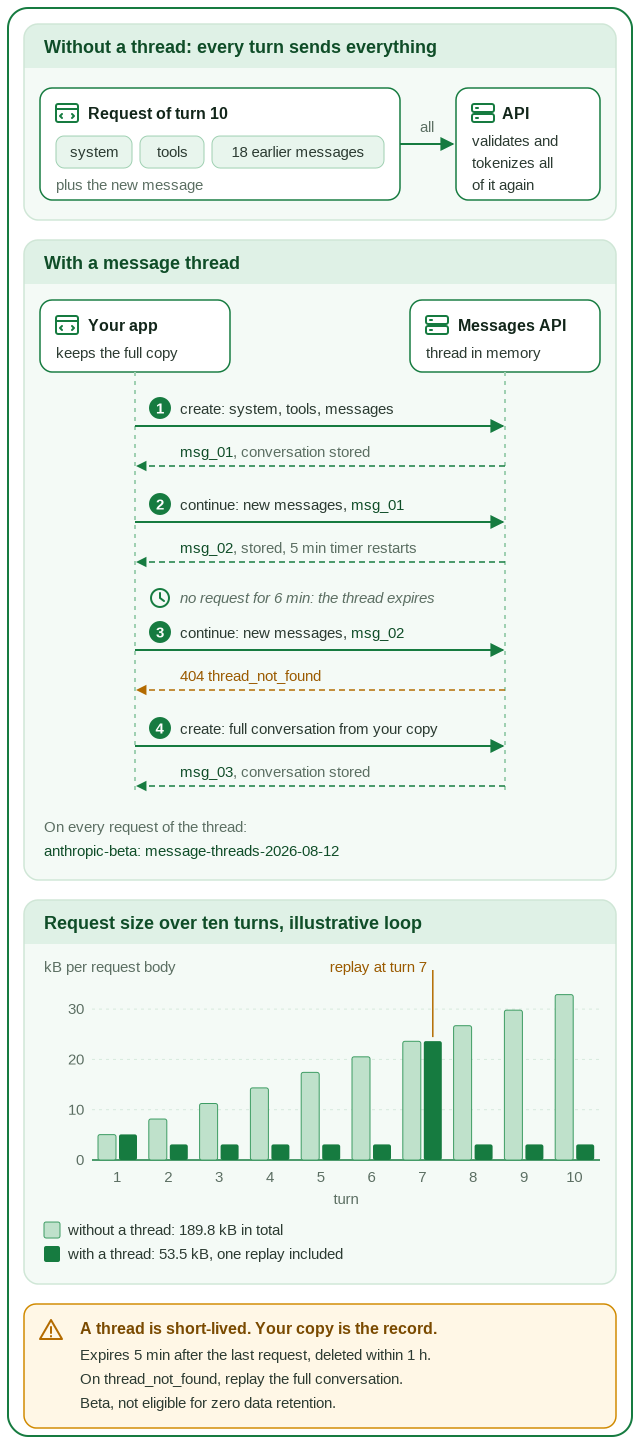
Message threads, in beta since 2 November 2026, change that. You send the full conversation once. After that, each request carries only the new messages and the id of the previous response, and the API rebuilds the conversation on its side. In the ten-turn example below, the request body stays at about 3 kB per turn after the first, except for one replay, instead of growing to 33 kB.
Read the figure from top to bottom: one request without a thread, the four requests of a thread that expires once, and the request size per turn from the example.
What message threads are#
A message thread keeps a conversation on Anthropic's servers for a short time. It is a parameter on the ordinary Messages API, thread, plus the beta header message-threads-2026-08-12. The response is the usual message.
Facts from the documentation and the release notes, as of 28 November 2026:
- Status: beta, announced in the release notes of 2 November 2026.
- Models: all models.
- Platforms: the Claude API, Claude Platform on AWS, Claude Models on Google Cloud (Anthropic managed) and Claude in Microsoft Foundry.
- Lifetime: a thread expires 5 minutes after its last request. Each response the API stores restarts those 5 minutes. The API deletes the thread no more than 1 hour after its last use.
- Price: threads do not change pricing or rate limits.
- Data handling: not eligible for zero data retention (ZDR) and not HIPAA eligible. The thread is held in memory, encrypted under a server-managed key, and never written to durable storage.
The documentation names the benefit as smaller requests and a time to first token that stays lower and steadier as the conversation grows. That is the vendor's claim; I have not measured it.
How a thread works#
There are three moves:
- Create. Send the first request as you do today, with system, tools and messages, and add
"thread": {"type": "create"}. The API stores the conversation, including the reply, under the response id. - Continue. Send only the messages since the previous response, with
"thread": {"type": "continue", "previous_message_id": "<id>"}. Leavesystemandtoolsout; sending either one, even as null, returns a 400 error. - Replay. A thread is best effort. When the API cannot continue it, a continue request returns 404 with
error.details.error_codeset tothread_not_found. Check that code before you replay, because a request for a model that does not exist also returns 404. You send the full conversation again in a new create request and continue from the new response id.
The rules that catch people:
- Fixed fields.
model,tool_choice,thinking,output_config, the top-levelcache_control, the set of beta headers and a few others go on every request of the thread, with the same value as on the create request. A different value returns 400thread_fingerprint_mismatch. To change one, start a new thread. - Append only. Each response id can be continued once. To edit or branch an earlier message, or to compact the history into a summary, start a new thread.
- Streaming. The response id arrives in
message_start, but continue only aftermessage_stop. If a stream drops, send the same continue request again, and replay if that returnsthread_already_continuedorthread_continue_in_flight. - Caching is separate. A thread does not cache your prompt. Add a top-level
cache_controlon every request if you want each turn cached.
The API rebuilds the full conversation before it calls the model. In my reading, a thread therefore saves upload, validation and tokenization, not input tokens: the model still reads the whole conversation, and prompt caching is what lowers that cost.
Where it helps, and where it does not#
Useful:
- Long agent loops. The documentation names them as the case where threads help most. Tool calls and tool results follow each other within seconds, well inside the 5 minutes, and each turn adds a small delta to a large history.
- Large tool sets and long system prompts. They are sent once per thread instead of once per turn.
- Clients on slow links. In my reading, a request that stays near the size of one turn uploads faster than one that grows with the history.
Not useful, or with care:
- Short exchanges. A two-turn call gains almost nothing, and the create request is slightly larger than the plain one.
- Human-paced chat. If a user often pauses for more than 5 minutes, many turns become replays and you are back to sending everything.
- Regulated data. Threads are not ZDR eligible, so keep ZDR workloads off them. Organizations with HIPAA readiness enabled cannot use them at all.
- Message Batches, token counting and on-demand compaction. These do not support threads. Count tokens on the full conversation instead.
Example: request sizes over ten turns#
The script below builds the request bodies of a ten-turn agent loop in both modes and prints their size. It sends nothing and needs no API key. The model replies are stubs: one tool call per turn, then a tool result of about 2.4 kB from the client. At turn 7 it pretends the thread expired and replays. The system prompt, eight tool schemas and the tool results are synthetic text, chosen only to make the growth visible.
I ran it with Python 3.12.14 and the standard library only.
"""Request bodies of a ten-turn agent loop, without and with a message thread.

Builds the JSON bodies only. Nothing is sent, so no API key is needed.
"""
import json

MODEL = "claude-opus-5-5"
SYSTEM = "You are an order support agent. Follow the refund policy. " * 40
TOOLS = [{"name": f"tool_{i}", "description": "Look up order data. " * 10,
          "input_schema": {"type": "object",
                           "properties": {"order_id": {"type": "string"}}}}
         for i in range(8)]
TOOL_RESULT = json.dumps([{"order": f"A-{n}", "status": "shipped"} for n in range(60)])


def size(body):
    return len(json.dumps(body).encode())


def reply(turn):
    """Stands in for the model: an id and one tool call per turn."""
    return {"id": f"msg_{turn:02d}", "role": "assistant", "content": [
        {"type": "tool_use", "id": f"toolu_{turn:02d}", "name": "tool_0",
         "input": {"order_id": f"A-{turn}"}}]}


def new_messages(turn):
    """What the client adds before a turn: the question, then tool results."""
    if turn == 1:
        return [{"role": "user", "content": "Why was my refund for A-1042 refused?"}]
    return [{"role": "user", "content": [{"type": "tool_result",
             "tool_use_id": f"toolu_{turn - 1:02d}", "content": TOOL_RESULT}]}]


def create(messages):
    return {"model": MODEL, "max_tokens": 1024, "system": SYSTEM, "tools": TOOLS,
            "messages": messages, "thread": {"type": "create"}}


def continue_(new, previous_id):
    return {"model": MODEL, "max_tokens": 1024, "messages": new,
            "thread": {"type": "continue", "previous_message_id": previous_id}}


history, previous_id = [], None  # the client keeps its own full copy
totals = [0, 0]
print("turn  stateless  threaded  thread request")
for turn in range(1, 11):
    new = new_messages(turn)
    history += new
    stateless = {"model": MODEL, "max_tokens": 1024, "system": SYSTEM,
                 "tools": TOOLS, "messages": history}
    if previous_id is None:
        body, kind = create(history), "create"
    elif turn == 7:  # pretend the thread expired: 404 thread_not_found
        body, kind = create(history), "replay (create)"
    else:
        body, kind = continue_(new, previous_id), "continue"
    print(f"{turn:>4}  {size(stateless):>9,}  {size(body):>8,}  {kind}")
    totals[0] += size(stateless)
    totals[1] += size(body)
    answer = reply(turn)
    history.append({"role": "assistant", "content": answer["content"]})
    previous_id = answer["id"]
print(f"total {totals[0]:>9,}  {totals[1]:>8,}  bytes")
The output, from a run on 28 November 2026:
turn  stateless  threaded  thread request
   1      5,061     5,091  create
   2      8,153     3,095  continue
   3     11,245     3,095  continue
   4     14,337     3,095  continue
   5     17,429     3,095  continue
   6     20,521     3,095  continue
   7     23,613    23,643  replay (create)
   8     26,705     3,095  continue
   9     29,797     3,095  continue
  10     32,889     3,095  continue
total   189,750    53,494  bytes
Three things to notice:
- The create request costs a little more. The
threadfield adds 30 bytes on turn 1. - A replay costs a full turn. At turn 7 the body is as large as the stateless one. In a real client it also follows a failed continue request; that request is rejected before the model runs and uses no tokens.
- The client still keeps everything.
historyholds the full conversation in both modes. Without it there is nothing to replay.
On the wire, a continue request with a follow-up question looks like this. A plain user message is only valid after a reply that ended in text; after a tool call, the new message carries the tool_result blocks. The headers and fields follow the official documentation; I did not send it, because it needs an API key:
curl -sS --fail-with-body https://api.anthropic.com/v1/messages \
  -H "x-api-key: $ANTHROPIC_API_KEY" \
  -H "anthropic-version: 2026-10-21" \
  -H "anthropic-beta: message-threads-2026-08-12" \
  -H "content-type: application/json" \
  -d '{
    "model": "claude-opus-5-5",
    "max_tokens": 1024,
    "messages": [{"role": "user", "content": "And the refund for A-1043?"}],
    "thread": {"type": "continue", "previous_message_id": "'"$previous_id"'"}
  }'
The SDKs also have a thread helper that creates, continues and replays on thread_not_found for you, and the beta tool runner uses a thread by default.
Pros, cons and limits#
| Aspect | Details |
|---|---|
| Pros | Requests stay near the size of one turn. System and tools are sent once per thread. No new endpoint: one field and one beta header on the Messages API. No price change. |
| Cons | Beta. Expires after 5 idle minutes, so you must build and test the replay path. Fixed fields lock model, thinking and tool choice for the life of the thread. |
| Limits | No API to list, read or delete a thread. Not available with Message Batches, token counting, on-demand compaction, most context editing, HIPAA readiness or inference hooks. At most 4 cache_control breakpoints per request. |
| State and data | Your application stays the source of truth: no response says whether the turn was stored. Not ZDR eligible. Files are held by reference, so keep them available while the thread is in use. |
| Lock-in | The thread parameter is specific to this API. Code that keeps its own history, as it must anyway, can drop the field and fall back to stateless requests. |
When to use it#
Use it for agent loops with many fast turns, large tool sets or long system prompts, where request size and time to first token grow with the history. Keep your own copy of the conversation, write the replay path first, and turn on prompt caching alongside it, because a thread does not cache the prompt and does not change pricing.
Skip it for short calls, for conversations with long human pauses, and for any workload that needs ZDR.
Next step: read the message threads documentation (opens in a new tab), in particular the table of fields to send on each request and the error codes, then add the thread field behind a flag and compare request size and time to first token on your own agent traces.