

A platform team running agents on Azure needs three things. One governed entry point for model traffic, so apps do not hold provider keys and nobody can spend without a limit. A way to send easy prompts to a cheap model and hard ones to a strong model, without hard-coding that choice. And grounding on company documents that respects who is allowed to read what.
At Ignite 2026 AI Gateway and the main Foundry IQ knowledge sources reached general availability, and model router gained new preview features. The Ignite recap of 24 November 2026 (opens in a new tab) lists AI Gateway as GA, model router with a new Auto mode in preview, and the main Foundry IQ knowledge sources as GA. The catch: each product mixes GA and preview parts.
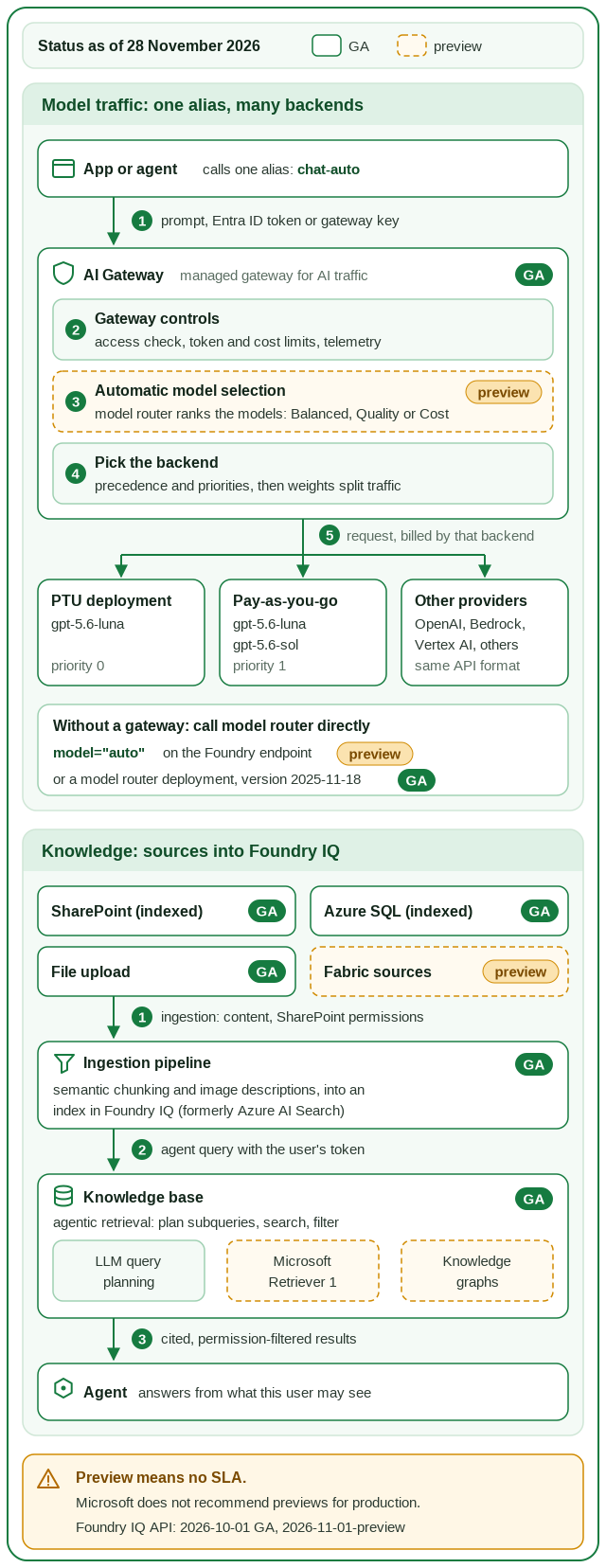
The figure follows one request through the gateway at the top and one document to a cited answer at the bottom, with solid boxes for GA and dashed amber boxes for preview.
What is GA and what is preview#
Status as of 28 November 2026.
| Capability | Status | What it gives you |
|---|---|---|
| AI Gateway | GA | One managed entry point for model and MCP traffic, with aliases, access control, limits and telemetry |
| Automatic model selection in AI Gateway | Preview | Model router ranks the models behind a gateway alias for each request |
| Model router deployment (version 2025-11-18) | GA | A deployment that picks a model per request, with your routing mode and model subset |
Model router Auto (model="auto") | Preview | Routing without a deployment, in all 32 model router regions |
| Model router through the Responses API and the Messages API | Preview | Chat Completions has no preview label |
| Per-request routing control, session affinity, own deployments serve first | Preview | Steer one request, keep a conversation on one model, use capacity you already pay for |
| Foundry IQ SharePoint (indexed), Azure SQL (indexed) and file knowledge sources | GA | Managed ingestion into the index; SharePoint carries its permissions |
| Semantic chunking and image descriptions | GA | Chunks that follow document structure, and text for charts and diagrams |
| Microsoft Retriever 1, knowledge graphs, Fabric sources | Preview | A hosted retrieval model, graph retrieval, Fabric IQ semantic models and OneLake items |
Preview features fall under Microsoft's preview terms: no service-level agreement, and Microsoft does not recommend them for production workloads.
AI Gateway and model router#
AI Gateway (opens in a new tab) is a managed gateway for AI traffic: requests to models and to MCP servers. It is its own product and resource type, Microsoft.ApiManagement/aigateways, separate from an API Management service.
Three objects matter for model traffic. A model provider holds the endpoint and credentials of a backend. A registered model points at an existing deployment; registering does not deploy anything. A model alias is the stable name an app calls. Apps authenticate with Microsoft Entra ID or a gateway runtime API key and never see the provider credentials. Policies set token limits and cost limits on estimated spend; the provider's bill stays the source for actual charges.
Model router picks a model per request. For each prompt it estimates how well each eligible model would answer, then applies a routing mode: Balanced (the default), Cost or Quality. It first filters out models that cannot serve the request, for example because of its tools or output format. The response names the model that answered.
Since Ignite the two work together. With automatic model selection on an alias, the request in the figure goes through five steps:
- The app calls the alias with an Entra ID token or a gateway key.
- The gateway authorizes the caller and applies its policies.
- Model router ranks the alias's models for this prompt, in the alias's selection mode.
- Precedence combines that ranking with your priorities. "Model first" takes the best-ranked model from any priority group; if that model sits in several groups, the highest-priority group serves it. "Priorities first" only considers the highest-priority group. Weights then split traffic between backends of the same model, such as two regions.
- The chosen backend serves the request and bills it at its own price. Model router only ranks.
Foundry IQ#
Azure AI Search is now called Foundry IQ. Endpoints, SDKs, REST API versions and RBAC roles stay the same. For agents, a knowledge base references one or more knowledge sources, and agentic retrieval splits a question into subqueries, runs them against those sources, reranks the results and returns extractive data with citations.
The GA part is the ingestion side. SharePoint (indexed) brings document libraries, lists and site pages into the index, with supported user, Entra group and site group permissions stored on each chunk. At query time the app sends its own credentials plus the user's token in the x-ms-query-source-authorization header, and results are filtered to what that user may read. Indexed Azure SQL and file knowledge sources are GA too, as are semantic chunking and image descriptions for charts and diagrams.
The status depends on the REST API version you call. The stable 2026-10-01 version carries the GA features, including model-backed query planning. The 2026-11-01-preview version adds the preview ones. Microsoft Retriever 1 (opens in a new tab) is a retrieval model hosted in Foundry IQ that plans queries on your existing index without an external planning model. The Ignite recap reports 32% fewer input tokens than BM25-only search in Microsoft's own agent evaluation.
Where it helps, and where it does not#
Useful now:
- One door for all model traffic. Several teams, several providers, one place for credentials, limits and telemetry. The gateway is GA, so it can carry production traffic today with priority and weight routing.
- Prompt-dependent model choice. Many calls in an agent loop, such as picking the next tool, do not need the strongest model. A model router deployment is GA for this when you call it directly.
- Permission-aware grounding on SharePoint. The indexed SharePoint source is GA and filters chunks per user.
Not yet, or with care:
- Routing inside the gateway is preview. If you need ranked routing across non-Foundry backends behind one alias, you are on preview terms.
- Parameters are not adapted in the gateway. A parameter the chosen model does not support returns an error, so send only parameters every model behind the alias supports.
- Responses API state. In the gateway, a follow-up turn with
previous_response_idgoes back to the backend of the earlier turn, without a new ranking. - Mixed API formats. An alias offers only the API formats all its models share. Anthropic Claude models and OpenAI models cannot share one alias.
- Permission freshness. SharePoint permissions are captured at indexing. A permission change on a parent scope can need an explicit resync, and sensitivity labels are checked only on the remote SharePoint path, which is preview.
Example: what an alias does with a ranking#
The configuration below comes from the Learn page on model router with AI Gateway. It turns on automatic model selection with "Model first" precedence and the Balanced mode for two Foundry deployments. It needs an Azure subscription, so it was not run here. The gateway API version is 2026-11-01.
{
  "properties": {
    "aliasName": "chat-auto",
    "backendModels": [
      { "resourceId": "<registered-model-resource-id-for-gpt-5.6-luna>", "selectorModelName": "gpt-5.6-luna", "priority": 0, "weight": 1 },
      { "resourceId": "<registered-model-resource-id-for-gpt-5.6-sol>", "selectorModelName": "gpt-5.6-sol", "priority": 0, "weight": 1 }
    ],
    "selectionOrder": ["autoModelSelection", "priority"],
    "autoModelSelection": { "objective": "Balanced" }
  }
}
Precedence decides which capacity pays for a request, so I modelled it locally. The script below reproduces the worked example on the same Learn page, a different alias from the JSON above: one PTU and two pay-as-you-go backends. The ranking that model router would return is written by hand, because the real ranking is a service. This is a model of the documented rule, not the gateway's code. It uses the Python 3.12 standard library only.
"""Which backend serves a request behind an AI Gateway alias (local model)."""
import random

# The alias from the docs example: PTU capacity at priority 0,
# pay-as-you-go deployments at priority 1. Lower number wins.
BACKENDS = [
    {"name": "ptu-luna", "model": "gpt-5.6-luna", "priority": 0, "weight": 1},
    {"name": "payg-luna", "model": "gpt-5.6-luna", "priority": 1, "weight": 1},
    {"name": "payg-sol", "model": "gpt-5.6-sol", "priority": 1, "weight": 1},
]


def choose(ranking, selection_order):
    """ranking: model names, best first. selection_order: as on the alias."""
    if selection_order[0] == "priority":
        # Priorities first: only the highest-priority group is eligible.
        top = min(b["priority"] for b in BACKENDS)
        pool = [b for b in BACKENDS if b["priority"] == top]
        model = next(m for m in ranking if any(b["model"] == m for b in pool))
    else:
        # Model first: best-ranked model across all groups, then its best group.
        model = next(m for m in ranking if any(b["model"] == m for b in BACKENDS))
        top = min(b["priority"] for b in BACKENDS if b["model"] == model)
    candidates = [b for b in BACKENDS if b["model"] == model and b["priority"] == top]
    # Weights split traffic among backends of the same model and priority.
    pick = random.choices(candidates, weights=[b["weight"] for b in candidates])[0]
    return pick["name"]


RANKINGS = {"simple": ["gpt-5.6-luna", "gpt-5.6-sol"],
            "hard": ["gpt-5.6-sol", "gpt-5.6-luna"]}
ORDERS = {"Model first": ["autoModelSelection", "priority"],
          "Priorities first": ["priority", "autoModelSelection"]}

for prompt, ranking in RANKINGS.items():
    for label, order in ORDERS.items():
        print(f"{prompt:<6}  {label:<16}  -> {choose(ranking, order)}")
The output of a run on 28 November 2026 with Python 3.12.14:
simple  Model first       -> ptu-luna
simple  Priorities first  -> ptu-luna
hard    Model first       -> payg-sol
hard    Priorities first  -> ptu-luna
A simple prompt lands on the PTU capacity either way. For a hard prompt, "Model first" pays for the stronger model at priority 1, while "Priorities first" stays on the reserved capacity. That matches the documented example.
Without a gateway, the shortest path is Auto: set model to "auto" in a Responses API or Chat Completions request to the /openai/v1/ endpoint of your Foundry resource. When you need dedicated rate limits, your own routing mode or model subset, or Data Zone Standard processing, deploy model router and replace "auto" with the deployment name.
Pros, cons and limits#
| Aspect | Details |
|---|---|
| Pros | Gateway, router deployment and the main Foundry IQ sources are GA. Model choice and backend choice move out of application code. SharePoint permissions reach the chunk level. |
| Cons | The newest parts, Auto, ranked routing inside the gateway and Retriever 1, are preview. Quality and cost estimates of the router rest on internal and external benchmarks, not on your workload. |
| Pricing model | Direct router calls pay a routing fee per million input tokens plus the selected model's usage. In the gateway there is no router fee during the preview, but gateway charges and backend usage apply. |
| Lock-in | Aliases, policies and knowledge bases are Azure resources. The gateway can front non-Azure backends, but the control plane stays in Azure. |
| Limits | Parameters are not adapted in the gateway, previous_response_id turns skip ranking, and Claude and OpenAI models need separate aliases. Preview features have no SLA. |
When to adopt it#
Put AI Gateway in front of your model traffic now if several apps or teams call models. Use priority and weight routing on GA features for production, and run a model router deployment directly where you want prompt-dependent model choice. Move SharePoint grounding to the indexed knowledge source on the 2026-10-01 API.
Keep Auto, ranked routing inside the gateway, Microsoft Retriever 1 and knowledge graphs in a test environment until they reach GA.
Next step: read Use model router with AI Gateway (opens in a new tab) for the alias settings, and What's new in Foundry IQ (opens in a new tab) to see which API version carries the features you need.