

You want an open model, a Nemotron or Qwen checkpoint for example, behind an API, and the requests must stay in the EU. Done by hand, that means GPU virtual machines or an AKS cluster and a vLLM image you build and patch yourself. Managed Compute in Microsoft Foundry takes over that layer. You pick a model from the catalog and a deployment template, set the deployment SKU to DataZoneManagedCompute, and get a deployment on the same Foundry endpoint as your other models. Your code calls it with the OpenAI SDK and the deployment name. You pay per GPU hour while it exists.
The figure shows the path: the top panel holds the four choices that make a deployment, the bottom panel what serves a request inside the zone.
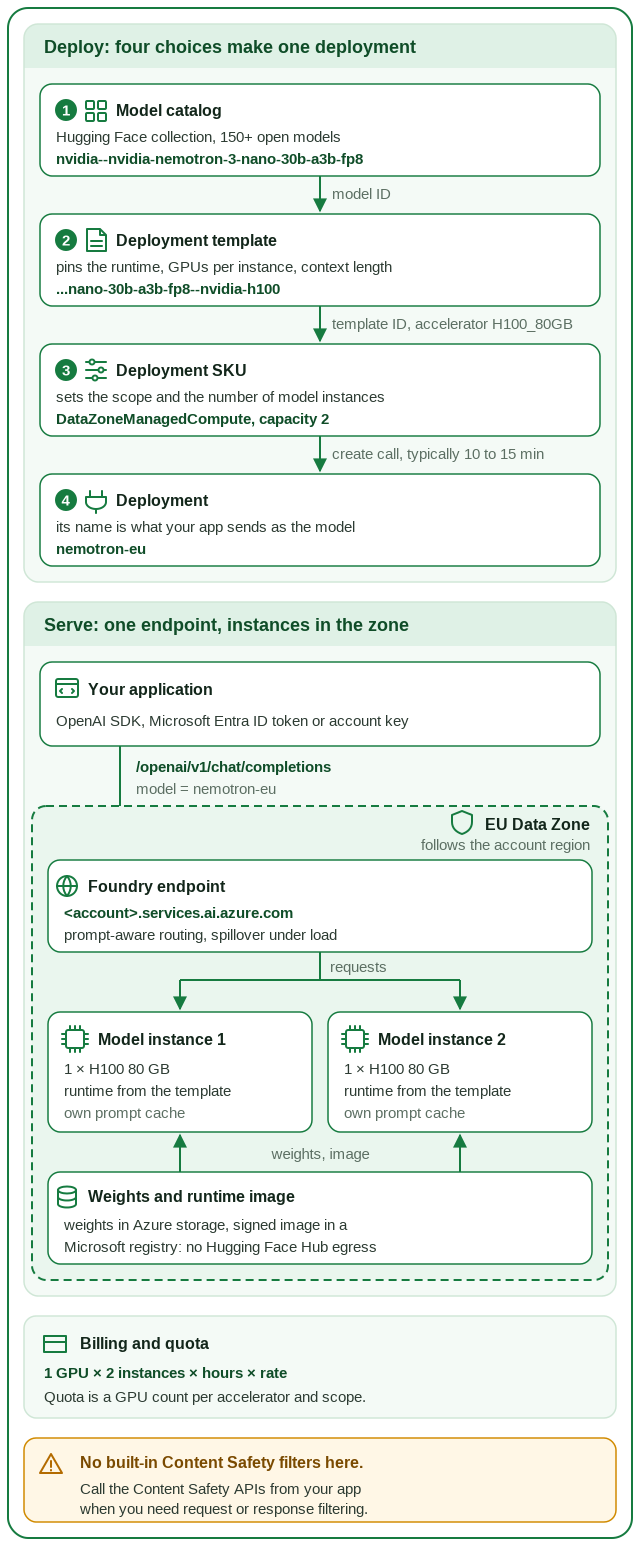
What Managed Compute is#
Microsoft announced general availability on 20 November 2026, after a public preview that started at Build on 3 June 2026. It is the third deployment type in Foundry, next to the two that serve models sold by Azure:
| Deployment type | What it serves | Billing |
|---|---|---|
| Standard (pay per token) | Foundry Models sold by Azure | Per input and output token |
| Provisioned throughput | Foundry Models sold by Azure | Reserved throughput units |
| Managed compute | Open-source and community models from the catalog | Hourly per accelerator |
Microsoft owns the GPU topology, the serving runtime, the container image and the patches. You choose the model, the template and the number of instances. The deployment shares the Foundry endpoint, authentication, SDKs, monitoring and bill with the other deployment types.
The models come from the Hugging Face collection in the Foundry catalog (the azure-huggingface registry): more than 150 for Managed Compute, according to the GA post. Every model in the collection uses SafeTensors weights and has passed a license review; models that would need trust_remote_code are remediated or excluded. The weights are staged in Microsoft-managed Azure storage, so a deployment needs no outbound access to the Hugging Face Hub. Gated Hugging Face models are not in the collection.
How it works#
- Model instance. The unit of deployment and of scale. An instance uses 1, 2, 4 or 8 GPUs, as its template defines. The
capacityon the SKU counts instances, not GPUs. - Deployment template. A versioned asset that pins the runtime (vLLM, SGLang, TensorRT-LLM, NVIDIA NIM, Text Embeddings Inference, llama.cpp or hf-serve), the accelerator family and count, the context length and the runtime tuning. You cannot set runtime flags yourself; the template is how you choose how the model runs.
- Accelerator family.
A100_80GB,H100_80GB,H200_141GBorMI300_192GB, never a VM size. - Scope.
GlobalManagedComputegives the broadest capacity.DataZoneManagedComputekeeps processing within the US or EU data zone. There is no zone parameter: the zone follows the region of your Foundry account. - Quota. Counted in GPUs, per subscription, per accelerator family and per scope (Global, or Data Zone US or EU). It is separate from Azure VM quota, which cannot be used here.
One model usually has several templates. The overview lists four for qwen3-32b, all on vLLM: one A100 or H100 at 40K context, two A100 or H100 at 128K. Context length, GPU count and cost move together.
A deployment answers on https://<account>.services.ai.azure.com/openai/v1/ when its runtime is OpenAI-compatible, with the deployment name in the model field. Every deployment also answers on /managed-deployments/<deployment-name>/, for models with their own API.
With two or more instances, Foundry favours sending requests with the same prompt prefix to the same instance, where the engine and model support it, because each instance has its own prompt cache. Under load, a request can spill over to another instance, which may have a cold cache. An optional prompt_cache_key is an affinity hint, not a guarantee. A saturated runtime rejects new requests with HTTP 429. Sizing is covered on the production workloads page (opens in a new tab).
Where it fits, and where it does not#
Good fits:
- EU-resident inference on open models without a team that runs GPU nodes, images and CVE patches. Runtime patches reach live deployments without a redeploy.
- Open and Azure-sold models side by side. One endpoint and one authentication model; switching models changes only the deployment name.
- Private networks. No egress to the Hugging Face Hub is needed.
- Steady traffic on a fixed model. Cost follows the hours the deployment exists, not your token count.
Where self-hosting or another deployment type still wins:
- A model outside the collection. Gated models, licenses that do not permit commercial use and redistribution, or models excluded because they need
trust_remote_code. Bring Your Own Weights is in limited public preview and LoRA adapters are in preview, as of 28 November 2026. - Control over the runtime. If you tune vLLM flags, run a custom build or need speculative decoding with your own draft model, you need your own serving stack.
- Bursty or low traffic. A deployment bills every hour it exists. The documented way to stop billing is to delete it, and a new deployment typically takes 10 to 15 minutes. If a pay-per-token deployment offers the same model, it is usually the better fit for low volume.
- Inline content filtering. Built-in Azure AI Content Safety filters are not in the data path; you call the Content Safety APIs yourself.
- GPUs you already run well. An AKS GPU platform with high utilisation may cost less per GPU hour. Compare with your own numbers.
Example: deploy in the EU Data Zone and call it#
The two scripts below come from the Microsoft Learn deployment guide and the GA post, with the Data Zone SKU, two instances, our own deployment name and an optional prompt_cache_key routing hint. The token scope follows the GA post and the overview; the SDK sample in the deployment guide uses https://cognitiveservices.azure.com/.default. They were not run here: they need an Azure subscription, a Foundry account in an EU region, approved H100 quota for the Data Zone scope, Cognitive Services Contributor (or Foundry Owner) to deploy and Foundry User to call with Microsoft Entra ID.
pip install "azure-mgmt-cognitiveservices==15.0.0b2" azure-identity openai
az loginfrom azure.identity import DefaultAzureCredential
from azure.mgmt.cognitiveservices import CognitiveServicesManagementClient
SUBSCRIPTION_ID = "<your-subscription-id>"
RESOURCE_GROUP = "<your-resource-group>"
ACCOUNT_NAME = "<your-foundry-account>" # a Foundry account in an EU region
DEPLOYMENT_NAME = "nemotron-eu"
REGISTRY = "azureml://registries/azure-huggingface"
MODEL = f"{REGISTRY}/models/nvidia--nvidia-nemotron-3-nano-30b-a3b-fp8/versions/2"
TEMPLATE = (f"{REGISTRY}/deploymenttemplates/"
"nvidia--nvidia-nemotron-3-nano-30b-a3b-fp8--nvidia-h100/labels/latest")
client = CognitiveServicesManagementClient(DefaultAzureCredential(), SUBSCRIPTION_ID)
deployment = client.managed_compute_deployments.begin_create_or_update(
resource_group_name=RESOURCE_GROUP,
account_name=ACCOUNT_NAME,
deployment_name=DEPLOYMENT_NAME,
resource={
"sku": {"name": "DataZoneManagedCompute", "capacity": 2},
"properties": {
"model": MODEL,
"deploymentTemplate": TEMPLATE,
"acceleratorType": "H100_80GB",
"versionUpgradeOption": "OnceNewDefaultVersionAvailable",
},
},
).result() # blocks until a terminal state, typically 10 to 15 minutes
print(deployment.properties.provisioning_state, deployment.sku.capacity)The guide expects Succeeded. A Failed state is commonly caused by missing quota for that accelerator and scope, or by a template that does not match the model version. versionUpgradeOption opts the deployment in to new default model and runtime versions.
The call uses the OpenAI SDK against the Foundry endpoint:
from azure.identity import DefaultAzureCredential, get_bearer_token_provider
from openai import OpenAI

ACCOUNT_NAME = "<your-foundry-account>"

token_provider = get_bearer_token_provider(DefaultAzureCredential(), "https://ai.azure.com/.default")
client = OpenAI(
    base_url=f"https://{ACCOUNT_NAME}.services.ai.azure.com/openai/v1/",
    api_key=token_provider,
)

response = client.chat.completions.create(
    model="nemotron-eu",  # the deployment name, not the model ID
    messages=[{"role": "user", "content": "Explain GPU memory in two sentences."}],
    max_completion_tokens=1024,
    extra_body={"prompt_cache_key": "docs-assistant"},  # optional routing hint
)
print(response.choices[0].message.content)
When the runtime reports cache use, response.usage.prompt_tokens_details.cached_tokens shows how many input tokens were reused.
What it costs#
The overview gives the cost formula: accelerators per instance × instances × hours running × hourly rate. The script below applies it to the Global list prices shown on the pricing page on 28 November 2026. The page lists no Data Zone rates on that date, so check the price for your scope in the deployment wizard, which shows the hourly cost before you deploy.
"""Monthly cost of a Managed Compute deployment, from the documented formula:

accelerators per instance x instances x hours running x hourly rate
"""

# Global list prices in USD per GPU hour, Foundry Models pricing page, 28 November 2026.
RATE = {"A100_80GB": 3.95, "H100_80GB": 7.91, "H200_141GB": 9.10, "MI300_192GB": 7.91}

# (label, accelerator, GPUs per instance from the template, instances, hours per month)
SCENARIOS = [
    ("Nemotron 3 Nano, 1 x H100, 2 instances, always on", "H100_80GB", 1, 2, 730),
    ("Qwen3 32B 128K, 2 x H100, 2 instances, always on", "H100_80GB", 2, 2, 730),
    ("Qwen3 32B 128K, 2 x A100, 2 instances, always on", "A100_80GB", 2, 2, 730),
    ("DeepSeek 1017, 4 x MI300X, 1 instance, always on", "MI300_192GB", 4, 1, 730),
    ("DeepSeek 1017, 4 x MI300X, 5 instances, always on", "MI300_192GB", 4, 5, 730),
    ("Qwen3 32B 128K, 2 x H100, 2 instances, 12 h x 22 days", "H100_80GB", 2, 2, 12 * 22),
]

print(f"{'scenario':<55}{'GPUs':>5}{'USD/month':>12}")
for label, accel, per_instance, instances, hours in SCENARIOS:
    gpus = per_instance * instances
    cost = gpus * hours * RATE[accel]
    print(f"{label:<55}{gpus:>5}{cost:>12,.0f}")
The output of python3.12 gpu_cost.py, run on 28 November 2026 with Python 3.12.14 and the standard library only:
scenario                                                GPUs   USD/month
Nemotron 3 Nano, 1 x H100, 2 instances, always on          2      11,549
Qwen3 32B 128K, 2 x H100, 2 instances, always on           4      23,097
Qwen3 32B 128K, 2 x A100, 2 instances, always on           4      11,534
DeepSeek 1017, 4 x MI300X, 1 instance, always on           4      23,097
DeepSeek 1017, 4 x MI300X, 5 instances, always on         20     115,486
Qwen3 32B 128K, 2 x H100, 2 instances, 12 h x 22 days      4       8,353
These are list-price illustrations, not a quote or a measurement. GPU counts per instance come from the templates in the overview (Qwen3) and the GA post (DeepSeek). For Nemotron, one H100 is read from the template name --nvidia-h100; check it in the deployment wizard. 730 hours is an average month. What they show:
- The template sets the price. The same Qwen3 32B at 128K context costs half as much per hour on A100 as on H100. Whether A100 throughput is enough for your traffic is something to measure, not assume.
- Scale-out is linear. Five DeepSeek instances are 20 MI300X GPUs, as the GA post shows, and so five times the bill.
- Office hours save only if you delete. The last row assumes you delete the deployment every evening and create it again every morning, with typically 10 to 15 minutes of provisioning each time.
Pros, cons and limits#
| Aspect | Details |
|---|---|
| Maturity | GA since 20 November 2026. LoRA adapters are in preview and Bring Your Own Weights in limited public preview. The management SDK in the guide is a beta release, 15.0.0b2. |
| Pricing model | Per GPU hour while the deployment exists, by accelerator family and scope. No per-token price. Global list prices are published; Data Zone prices were not on the pricing page on 28 November 2026. |
| Data residency | DataZoneManagedCompute keeps processing in the US or EU data zone of the account region. Check the Azure data residency terms for what that covers in your compliance case. |
| Operations | No VMs, clusters or images to run. Runtime patches roll out to live deployments. Scaling is a change of capacity, and new instances need time to provision and warm up. |
| Lock-in | Low at the API level: OpenAI-compatible route, open weights. Templates, quota and routing are Foundry-specific. |
| Missing | Gated models, your own runtime flags, inline Content Safety filtering, and a documented way to pause billing without deleting the deployment. |
When to choose it#
Choose Managed Compute for an open model from the catalog, with EU data residency and steady traffic, when you do not want to run GPU infrastructure. Start with one template, one or two instances and a representative load test, and read throughput, status codes and latency in Azure Monitor before you add instances.
Keep your own vLLM stack when the model is not in the collection, when you need runtime control, or when your GPUs already run at high utilisation. Use pay per token when the model is offered that way and traffic is low or bursty.
Next step: read the Managed Compute overview (opens in a new tab), then request Data Zone quota for one accelerator family. That quota is separate from your VM quota, so it is the first thing to arrange.