

A vLLM configuration usually carries a hand-tuned --gpu-memory-utilization: the default 0.92, a higher value to get more cache, a lower one after an out-of-memory crash under load. The value is a guess about how much memory CUDA graphs and warmup buffers will take after the KV cache has already been sized.
vLLM 0.34 stops guessing. It sizes the KV cache from the memory actually free after CUDA graph capture and warmup, and the release notes say that in most cases you should remove gpu_memory_utilization from your configs. The same release moves the default block size from 16 to 64 and removes Model Runner V1, and both can break a setup on the first start. For a single-model deployment:
# before, on 0.33
vllm serve <model> --gpu-memory-utilization 0.92

# after, on 0.34: no utilization flag
vllm serve <model>
Add --block-size 16 only if the block size section below applies to you.
What is in vLLM 0.34#
vLLM 0.34.0 was published on GitHub on 16 November 2026 (UTC). It is a regular release, not a pre-release, and as of 28 November 2026 it is the latest release, with no 0.34.x patch yet. The notes count 1,061 commits from 412 contributors.
The changes that matter for an upgrade:
- Extensible KV cache on by default on CUDA and ROCm. With it,
gpu_memory_utilizationdefaults to 1.0 when you do not set it. - Default
--block-sizeis 64, up from 16. - Model Runner V1 is gone. Model Runner V2 is the only GPU runner.
- ROCm 10.0 only, and higher dependency floors, listed in the table further down.
The ten new models and the kernel speedups do not change how you upgrade, so this article leaves them out.
How the KV cache is sized now#
Up to and including 0.33, the default worked from an estimate. vLLM loaded the weights, ran a profiling pass for the activation peak, and gave the KV cache whatever was left of 92% of the device. CUDA graph memory was estimated with an extra capture pass, or ignored, and transients the profile did not exercise, such as attention workspaces, sampler and logprobs buffers and speculative-decoding drafts, had to fit in the remaining 8%. On a 192 GiB GPU that slack is about 15 GiB, idle when the estimate is right and too small when it is wrong.
The cache must exist before CUDA graph capture, because the graphs record its addresses. 0.34 uses the driver's virtual memory API for that. It reserves an address range for the whole budget, backs only the blocks that capture and warmup actually touch, then measures. Each worker takes the free memory, subtracts the transient peak (the larger of the profiling and the warmup peak) and a margin of max(1 GiB, 0.75 × peak), and reports how many blocks fit. The engine takes the minimum across workers and data-parallel engines and maps physical memory for that block count into the same range, so no address moves.
The figure shows the effect on one GPU, the startup steps and the block size change. Read the two columns of the top panel side by side: the idle slack on the left becomes KV cache on the right.
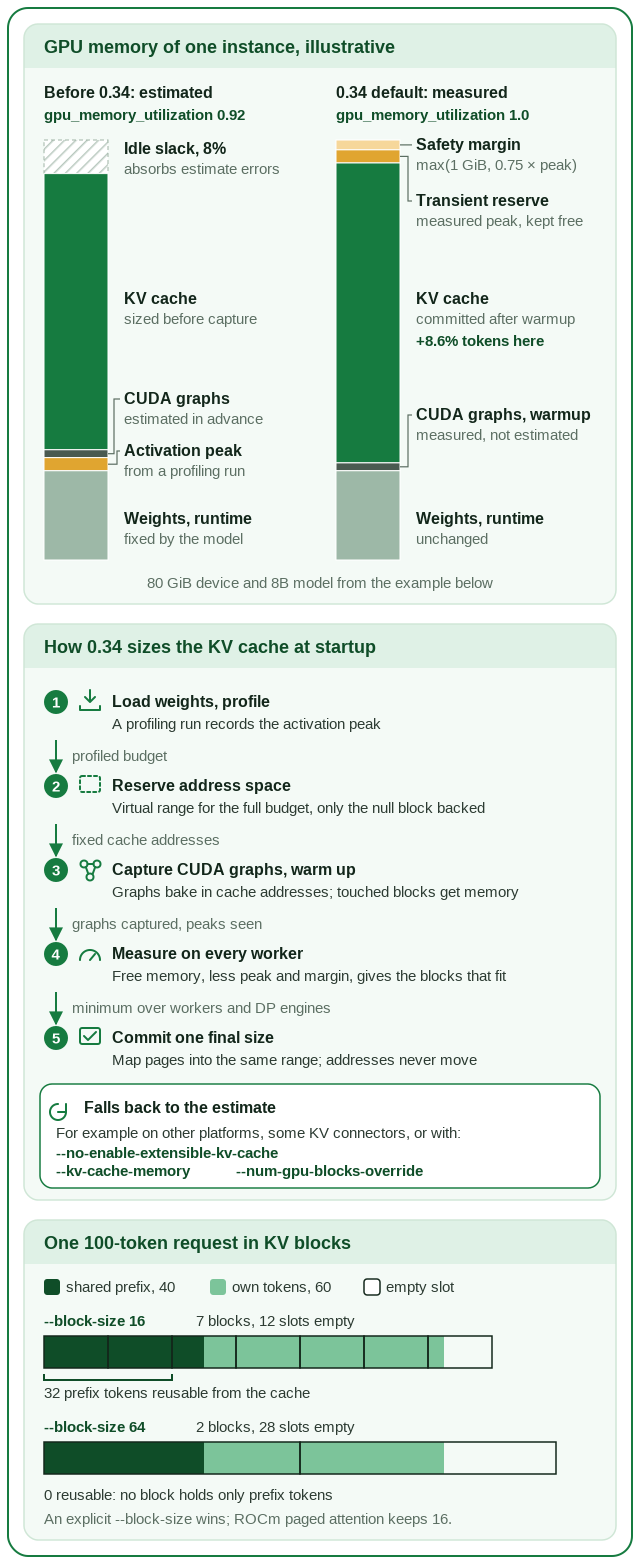
The pull request reports 4 to 10% more KV cache tokens per GPU across eight models on GB200, and 21 to 34% shorter engine initialisation, excluding weight loading, mostly because the throwaway capture pass that estimated graph memory is gone. Those are the project's own measurements, taken on the pull request before the release's follow-up fixes.
When to set gpu_memory_utilization anyway#
With the extensible cache, an explicit value is a hard cap on everything the instance uses, and anything below 1.0 takes memory away from the KV cache. vLLM logs a startup warning when a value close to 1.0 keeps free memory out of the cache. The 0.34 documentation names four reasons to set it below 1.0:
- Another process on the same GPU, such as a second vLLM instance or a training job. vLLM measures free memory once and cannot see later allocations.
- Unified-memory devices such as DGX Spark or Jetson.
- Weight updates during reinforcement learning, whose communicators and receive buffers are created after the cache is sized.
- KV connectors with their own device buffers, allocated after sizing.
The cache falls back to the old estimate in several cases, for example on other platforms (TPU, XPU, CPU and others), with some KV connectors (on ROCm: NIXL, Mooncake or MoRIIO), and when you pass --no-enable-extensible-kv-cache, --kv-cache-memory or --num-gpu-blocks-override. There, 0.92 is still the default and still means a fraction of the device. If you adopted --kv-cache-memory for faster restarts, you keep the old sizing.
One trade-off is in the release notes: per-token decode latency can rise on some models, with TPOT up 6 to 18% on some H200 models at concurrency 128. My reading is that a larger cache admits more concurrent sequences when the old cache was the limit, so batches get bigger. If decode latency is your SLO, measure it at your concurrency. The release notes name two ways back: --gpu-memory-utilization 0.9 or --no-enable-extensible-kv-cache. A cap gives a slightly smaller cache than 0.33 did at the same value, because measured graph memory is now subtracted.
Block size 64 and the other breaking changes#
The default --block-size moved from 16 to 64 to cut per-block bookkeeping; the pull request gives no throughput measurement for the change. An explicit --block-size still wins, and backends with a preferred size still override it, such as ROCm paged attention with 16. The pull request lists three costs:
- Prefix cache hits land on 64-token boundaries, so a shared prefix shorter than 64 tokens may no longer hit.
- More empty slots per request: up to 63 tokens in the last block instead of 15.
- Hard-coded block sizes fail at startup, for example a KV connector's
kv_connector_extra_config["block_size"]set to a value such as 16 or 48 that does not fit the 64-token default.
It follows that long prompts are affected too: only whole blocks are reused, so up to 63 tokens of a shared prefix are recomputed instead of up to 15.
The other items in the "Before you upgrade" table:
| Change | What breaks | What to do (my advice where the notes give none) |
|---|---|---|
| Model Runner V1 removed | VLLM_USE_V2_MODEL_RUNNER=0 fails at startup; the V1 logits-processor API is dropped | Remove the variable; port processors to vllm.v1.worker.gpu.sample.logits_processor |
| ROCm 7.2 dropped | ROCm 7.2 wheels and -rocm72 images are no longer published | Move to the ROCm 10.0 images and wheels |
| Dependency floors | Older huggingface_hub, tokenizers, timm or mistral-common in a shared environment | huggingface_hub 2.0.0, tokenizers 0.23.3, timm 1.0.30, mistral-common 1.13.0 or later |
QuTLASS and fp_quant removed | fp_quant checkpoints no longer load | Requantize, or stay on 0.33 for that model |
| Marlin W4A8 removed | The W4A8 paths and VLLM_MARLIN_INPUT_DTYPE are gone | --quantization humming with VLLM_HUMMING_INPUT_QUANT_CONFIG |
| Keye-VL and Keye-VL-1.5 removed | The model no longer loads | Stay on 0.33 for it |
Two of the API behaviour changes can surprise clients: the llama3_json tool parser no longer streams tool arguments incrementally, and an empty tools array is now accepted in both the Python and the Rust frontend. If you write plugins, use speculative decoding or run the Rust frontend, read the full list of breaking changes in the notes.
Example: what the new sizing and block size mean in numbers#
The script below does the arithmetic for one illustrative case: an 80 GiB GPU and a dense 8B model in BF16 with 36 layers, 8 KV heads and a head dimension of 128. The memory figures are assumptions, not measurements, and the old path is assumed to have estimated graph memory exactly. The script applies both rules, then counts blocks, empty slots and reusable prefix tokens at block sizes 16 and 64, with the standard library only.
"""KV cache budget before and after vLLM 0.34, and what block size 64 changes.

Plain arithmetic with illustrative inputs. It does not measure a GPU.
"""
import math

GIB = 1024**3

# Illustrative device and model, not a measurement.
total_gib = 80.0          # device memory
weights_gib = 16.0        # weights of a dense 8B model in BF16
overhead_gib = 1.0        # CUDA context and other non-torch memory
graphs_gib = 1.5          # CUDA graphs and warmup buffers
peak_gib = 2.5            # transient activation peak

# Model shape: keys and values for every layer, every KV head, every token.
layers, kv_heads, head_dim, dtype_bytes = 36, 8, 128, 2
bytes_per_token = 2 * layers * kv_heads * head_dim * dtype_bytes


def tokens(kv_gib):
    return int(kv_gib * GIB // bytes_per_token)


# Up to 0.33: a fixed budget of 0.92 of the device, sized before graph capture.
old_kv = 0.92 * total_gib - weights_gib - overhead_gib - peak_gib - graphs_gib

# 0.34: utilization 1.0, sized after warmup from what is actually free,
# minus the measured transient peak and a margin of max(1 GiB, 0.75 x peak).
free_after_warmup = total_gib - weights_gib - overhead_gib - graphs_gib
margin = max(1.0, 0.75 * peak_gib)
new_kv = free_after_warmup - peak_gib - margin

print(f"KV bytes per token: {bytes_per_token:,} ({bytes_per_token // 1024} KiB)")
print(f"up to 0.33: KV cache {old_kv:5.2f} GiB = {tokens(old_kv):,} tokens")
print(f"0.34:       KV cache {new_kv:5.2f} GiB = {tokens(new_kv):,} tokens"
      f" ({new_kv / old_kv - 1:+.1%}), margin {margin:.2f} GiB")

for block in (16, 64):
    print(f"\nblock size {block}: {tokens(new_kv) // block:,} blocks")
    for request in (100, 1000):
        used = math.ceil(request / block)
        print(f"  {request:>4}-token request: {used} blocks, "
              f"{used * block - request} slots empty in the last block")
    for prefix in (40, 1000):
        reusable = prefix // block * block
        print(f"  {prefix:>4}-token shared prefix: {reusable} tokens reusable")
The output, from a run on 28 November 2026 with Python 3.12.14:
KV bytes per token: 147,456 (144 KiB)
up to 0.33: KV cache 52.60 GiB = 383,021 tokens
0.34:       KV cache 57.12 GiB = 415,971 tokens (+8.6%), margin 1.88 GiB

block size 16: 25,998 blocks
   100-token request: 7 blocks, 12 slots empty in the last block
  1000-token request: 63 blocks, 8 slots empty in the last block
    40-token shared prefix: 32 tokens reusable
  1000-token shared prefix: 992 tokens reusable

block size 64: 6,499 blocks
   100-token request: 2 blocks, 28 slots empty in the last block
  1000-token request: 16 blocks, 24 slots empty in the last block
    40-token shared prefix: 0 tokens reusable
  1000-token shared prefix: 960 tokens reusable
Three things to read from it:
- The gain is the slack minus the margin. About 4.5 GiB more cache: 6.4 GiB of idle slack against a 1.9 GiB margin. Where the old path ignored graph or warmup memory, the slack was partly in use and the real gain is smaller.
- Long prefixes barely notice the block size. A 1,000-token system prompt keeps 960 of 992 reusable tokens. A short shared prefix loses all of its reuse.
- Empty slots are a small cost: at most 63 tokens per running request.
What to test before you roll it out#
Run the new version beside the old one on the same GPU type, with production-like traffic:
- Startup: every model and quantization you serve loads, with no
VLLM_USE_V2_MODEL_RUNNERand no hard-coded connector block size. - KV cache size: the capacity in the startup log against 0.33, and no utilization warning.
- Peak load: your longest prompts at your highest concurrency.
- Latency: TTFT and TPOT at your real concurrency, and the prefix cache hit rate if prompts share short prefixes.
- Neighbours: other processes on the GPU, and RL weight updates.
Pros, cons and limits#
| Aspect | Details |
|---|---|
| Pros | A larger KV cache without tuning on dedicated GPUs. Fewer runtime out-of-memory errors. Shorter engine initialisation. |
| Cons | Breaking defaults and removals. Decode latency can rise at high concurrency. Short shared prefixes lose cache hits. |
| Limits | CUDA and ROCm only. Free memory is measured once, after warmup. Several configurations fall back to the estimate. |
| Maturity | A new default in its first release, hardened with several fixes before the release (listed in the notes). Pin the version and watch for 0.34.x patch releases. |
When to upgrade#
Upgrade soon if you run one vLLM instance per CUDA or ROCm GPU and nothing else shares it: you get more cache and fewer out-of-memory restarts once the startup and latency checks pass. Plan more time if you share GPUs, run on unified memory, depend on short shared prefixes, use custom V1 logits processors or serve one of the removed quantization formats or models.
Next step: read the "Before you upgrade" table in the v0.34.0 release notes (opens in a new tab) against your deployment, then the GPU Memory Utilization section of the optimization guide (opens in a new tab) before you remove the flag.